

Recently, AWS announced Amazon Bedrock AgentCore, a flexible service that helps developers intuitively create and manage AI agents across different frameworks and models, whether they are hosted on Amazon Bedrock or other environments. Specifically, AgentCore Runtime provides a secure, serverless, and purpose-built hosting environment to deploy and run AI agents or tools. AgentCore is runtime framework agnostic, working seamlessly with popular frameworks like Langgraph, Strands, and CrewAI to deploy your AI agents and tools with automatic scaling and built-in security.
This post demonstrates how to use a GitHub Actions Workflow to automate the deployment of AI agents on AgentCore Runtime. The approach provides a scalable solution with enterprise-level security controls, providing full continuous integration and delivery (CI/CD) automation. A comprehensive pipeline enables seamless agent deployments following AWS best practices, including OpenID Connect (OIDC) authentication, least-privilege access controls, and environmental separation. Our solution facilitates efficient updates to existing agents and integrates continuous security scans and rigorous code quality checks. The result is a robust deployment strategy that helps reduce operational complexity, increase security, and accelerate AI agent development in enterprise environments.
Benefits of Amazon Bedrock AgentCore Runtime
AgentCore Runtime is the ideal service for production agent deployments:
- Provides a framework-agnostic environment to run agents
- Works with large language models (LLMs) such as those offered by Amazon Bedrock and Anthropic Claude
- Provides session isolation by running each user session in a dedicated microVM with isolated CPU, memory, and file system resources
- Supports both real-time conversations and long-running workloads up to 8 hours
- Provides built-in capabilities for authentication and observation
Solution overview
The solution is a comprehensive CI/CD pipeline built with GitHub Actions that streamlines agent deployment in line with security standards. It is provided as a ready-to-use solution that integrates with an existing development workflow. The solution includes the following key components:
The following figure shows the architecture for the solution.
Data flow consists of the following steps:
- A developer commits code changes from his local repository to the GitHub repository. In this solution, the GitHub action is triggered manually, but it can be automated.
- The GitHub action triggers the build phase.
- GitHub’s OIDC uses tokens to authenticate with AWS and access resources.
- GitHub Actions invokes commands to build and push the agent container image from the Dockerfile directly to Amazon ECR.
- AWS Inspector triggers an advanced security scan when an image is uploaded.
- An AgentCore runtime instance is created using the container image.
- The agent can further query the Amazon Bedrock model and invoke tools according to its configuration.
The following sections walk through the steps to deploy the solution:
- Download the source code from the GitHub repo.
- Create your agent code.
- Set up a GitHub secret.
- Create an IAM role and policies.
- Create a GitHub Actions workflow.
- Trigger and monitor the pipeline.
- Verify deployment.
Prerequisites
Before you can use our secure CI/CD pipeline to deploy agents to the AgentCore runtime, verify that you have the following conditions:
Download the source code
Clone the source code repository: bedrock-agentcore-runtime-cicd
git clone https://github.com/aws-samples/sample-bedrock-agentcore-runtime-cicd.git
The repository folder has the following structure:
Create the agent code
Build your agent with the framework of your choice using the AgentCore Runtime Toolkit. The toolkit uses BedrockAgentCoreApp to build an application that provides a standardized way to package your AI agent code into a container that can run on the AgentCore Runtime managed infrastructure. It also uses app.entrypointA Python decorator that marks a function as the main entry point. When an Amazon Bedrock agent receives an incoming API request, this function fetches and processes the user’s request. In this sample agent code, when someone calls your Amazon Bedrock agent using the API, the AgentCore runtime will automatically call the strands_agent_bedrock(payload) function.
In this post, we use agents/strands_agent.py File to create an agent using the Strands Agents Framework:
Set GitHub Secret
The GitHub Actions workflow must access the resources in your AWS account. In this post, we use the IAM OpenID Connect identity provider and IAM roles with IAM policies to access AWS resources. OIDC lets your GitHub Actions workflows access resources in AWS without the need to store AWS credentials as long-lived GitHub secrets. These credentials are stored as GitHub secrets in your GitHub repository settings. For more information see Using secrets in GitHub actions.
Create IAM roles and policies
Running agents or tools in the AgentCore Runtime requires an IAM execution role. For information about creating an IAM role, see Creating an IAM role.
The steps below create the required trust policy and execution role for the AgentCore runtime. See IAM Permissions for AgentCore Runtime for more details.
The following code is for the AgentCore runtime trust policy:
The following code is for the AgentCore runtime execution role:
Create GitHub Actions workflow
View the CI/CD workflow file here .github/workflows/deploy-agentcore.yml For details on creating a workflow. The following steps will be executed by the workflow:
- It uses the default Ubuntu Github runner for a given task in the pipeline.
- Installs the required dependencies mentioned in the workflow
requirement.txtfile. - It creates the Docker image and deploys it to the ECR repository.
- The image has been scanned with Amazon Inspector to identify potential vulnerabilities.
- AgentCore deploys the runtime agent as an endpoint.
- Tests the agent endpoint to verify workflow functionality.
Trigger and Monitor Pipeline
This pipeline can be triggered by changing a code in the agent folder or manually using the workflow dispatch option. This may further change depending on your organization’s branch strategy. update code in .github/workflows/deploy-agentcore.yml To change this trigger behavior.
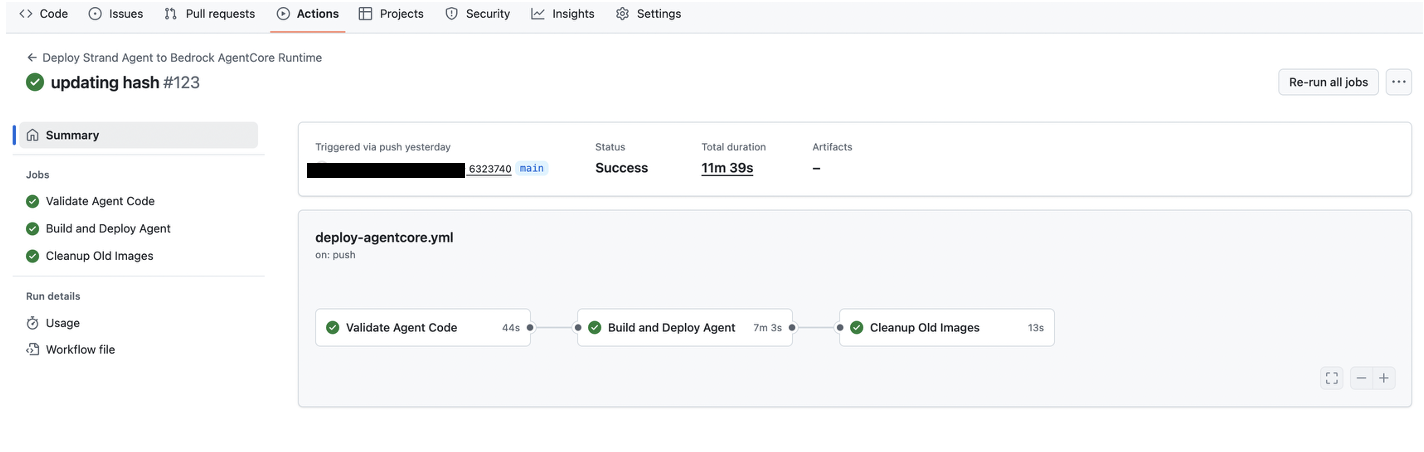
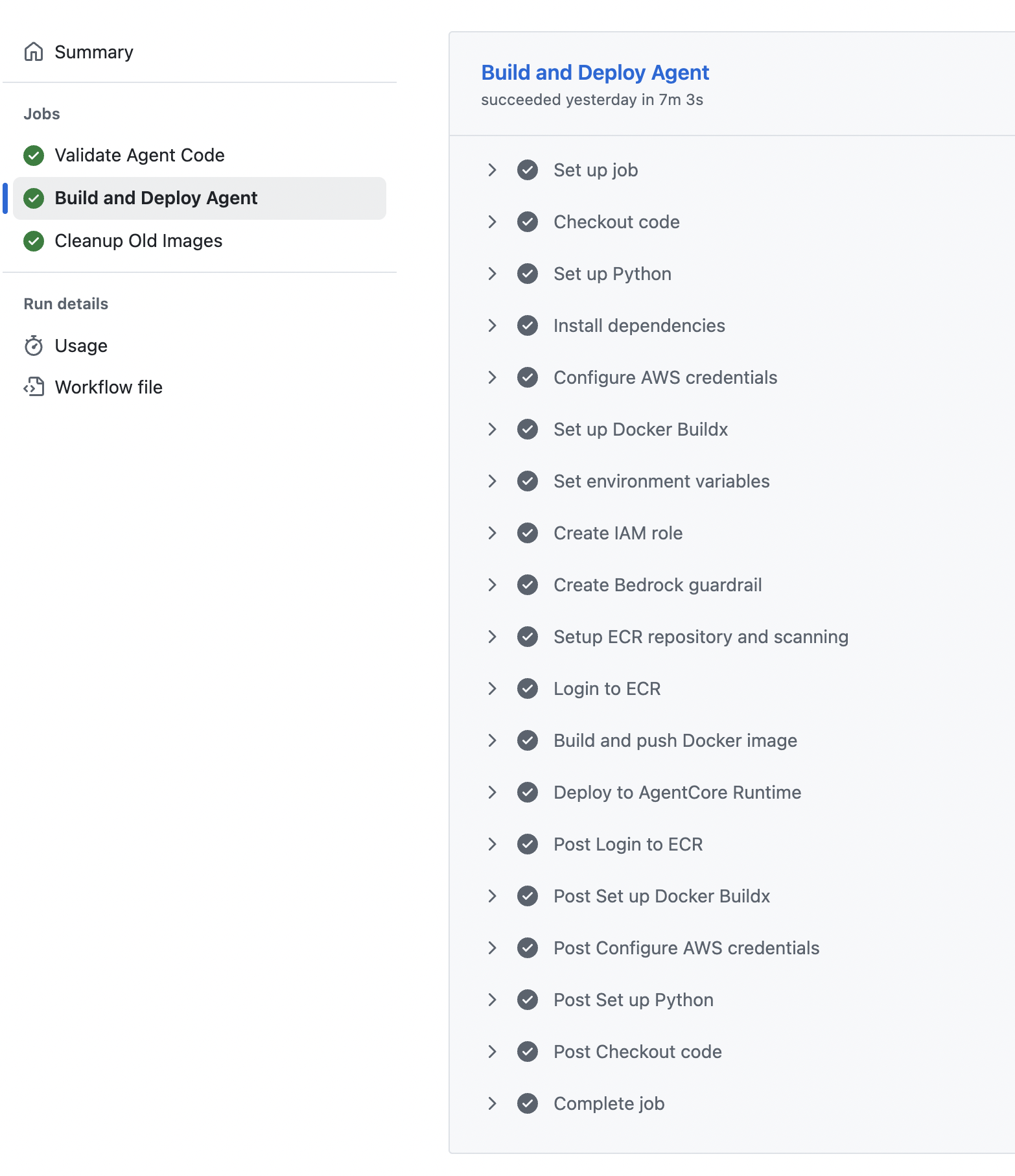
testing agent
Once the agent is deployed, we will verify its functionality by triggering testing agent Workflow manually through workflow dispatch option.
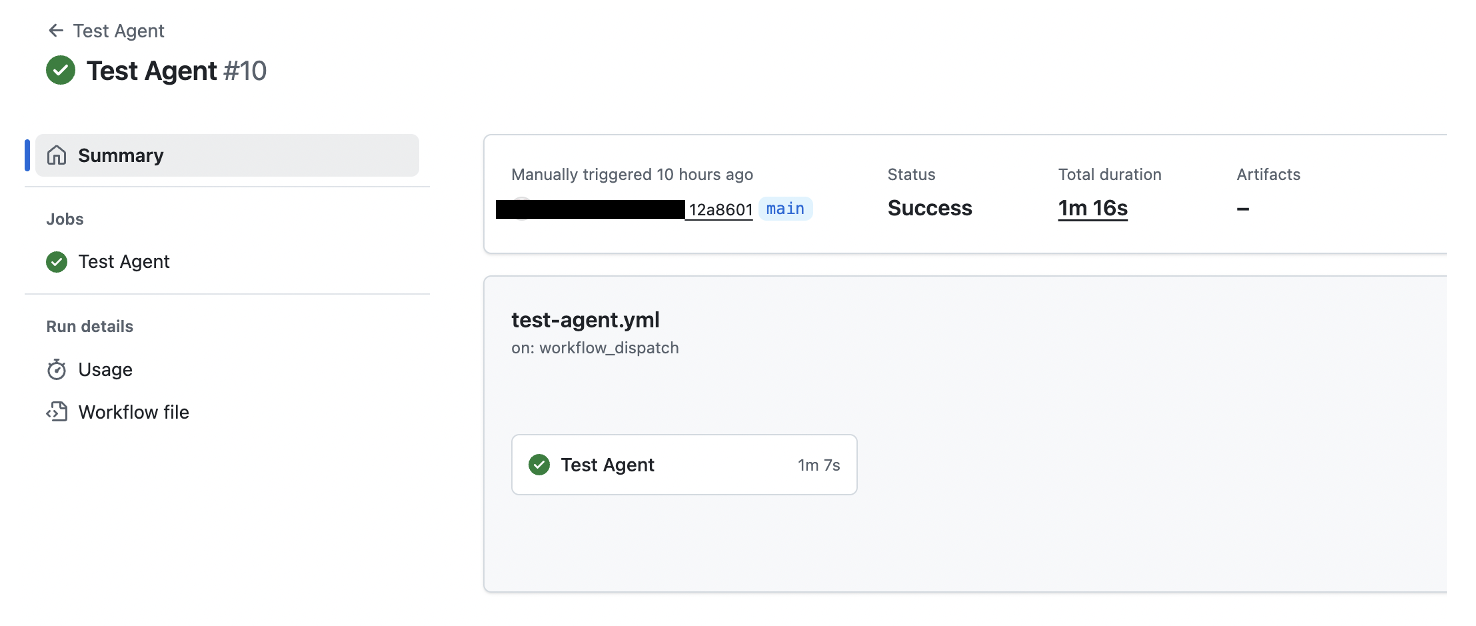
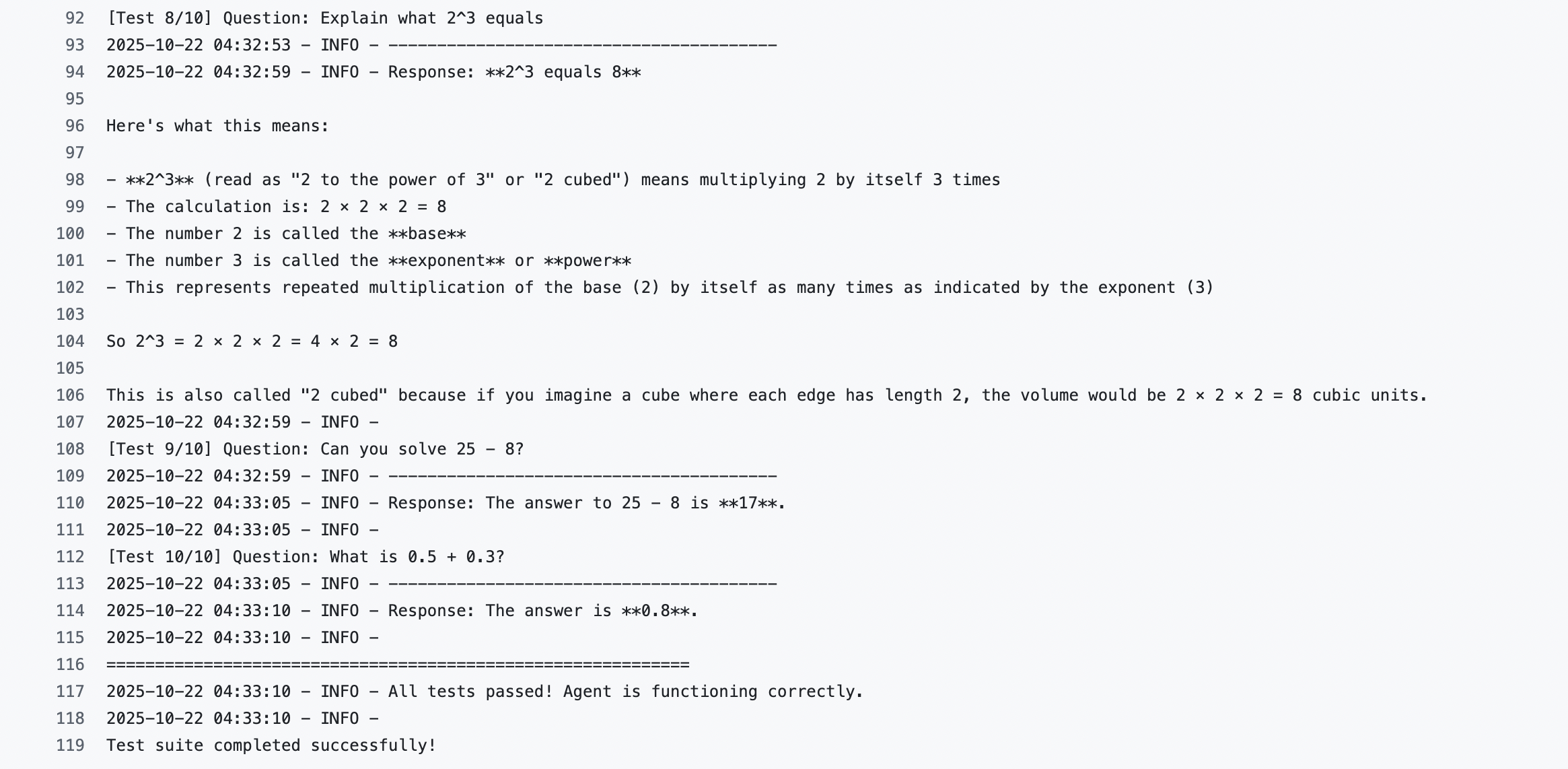
AgentCore runtime version and endpoint
Amazon Bedrock AgentCore implements automated versioning for the AgentCore runtime and lets you manage various configurations using endpoints. Endpoints provide a way to reference specific versions of the AgentCore runtime. For more details and sample code, see AgentCore runtime versions and endpoints.
Cleanup
To avoid future charges, complete the following steps:
- Delete ECR images from Amazon ECR console created through deployment using GitHub Actions.
- Delete an agent deployed in the AgentCore runtime.
Limitations and what to watch
A few caveats are worth noting. Amazon Bedrock AgentCore was a relatively new AWS service at the time of writing, so its APIs, quotas and supported features may change; the current AWS documentation should be treated as the source of truth. Stated capabilities such as session isolation in dedicated microVMs and workloads running up to eight hours reflect AWS’s own descriptions and may vary by region and configuration. Running agents on AgentCore, storing container images in Amazon ECR and executing GitHub Actions all incur costs, which is why the cleanup steps matter. Finally, the security posture of any CI/CD pipeline depends on how IAM roles, OIDC trust policies and repository secrets are scoped in practice — the template reduces friction but does not remove the need for careful review.
Conclusion
This post has demonstrated a comprehensive approach to using GitHub Actions for more secure and scalable deployment of AI agents on AgentCore Runtime. The solution provides a robust, automated, and controlled environment for generative AI applications, solving critical enterprise deployment challenges by automating dependency management, implementing continuous code quality checks, performing comprehensive vulnerability scanning, and facilitating consistent deployment processes. By removing infrastructure complexities, this pipeline helps developers focus on agent logic and functionality, while providing a framework-agnostic approach that supports seamless management of multiple AI agents at scale. As AI agents continue to transform enterprise capabilities, this solution represents a significant step toward streamlining AI agent development and operational management, offering a standardized, secure, and efficient deployment mechanism for modern generative AI applications.
As a next step, you can use Amazon Q to intelligently enhance and optimize your AI agent deployment pipeline, transforming your CI/CD processes with advanced, context-aware automation.
About the authors
 Praful Gupta is an Associate Delivery Consultant at AWS based in Gurugram, India. Having started his professional journey with Amazon a year ago, he specializes in DevOps and generative AI solutions, helping customers with their cloud transformation. Outside of work, he enjoys networking with fellow professionals and spending time with family. Connect on LinkedIn here: linkedin.com/in/prafffulgupta11/
 Anshu Bathla is a Consultant – SRC at AWS, based in Gurugram, India. He works with clients across a range of verticals to help strengthen their security infrastructure and meet their security goals. Outside of work, Anshu enjoys reading and gardening. Connect on LinkedIn here: http://linkin.com/in/anshu-bathla/
