
Introduction
The short demonstration below shows the appeal of the system covered in this guide: a full local model that can be talked to in real time, working out of the box. It feels close to talking to a person, because the system can listen and speak at the same time.
This is not the usual pattern of speak, wait, then receive a reply. PersonaPlex is a real-time speech-to-speech conversational model that handles interruptions, overlaps, and natural conversational cues such as “uh-huh” or “right” while the other party is still talking. It is designed to be full-duplex, listening and generating speech simultaneously rather than forcing the user to pause first, which makes a conversation feel more fluid than a traditional voice assistant.
PersonaPlex was open-sourced by NVIDIA. It is a roughly 7-billion-parameter speech-to-speech model built on the Moshi architecture, processing audio directly to audio with a streaming transformer to reduce delay. Because the weights are open and it runs on a local GPU, it offers privacy, no API dependency, and no per-call cost. This guide covers setting up a Linux environment, installing PersonaPlex locally, and starting its web interface to talk to the model in a browser. Readers interested in adjacent work may also see this overview of an open-source speech recognition model for edge devices.
Using PersonaPlex locally: a step-by-step guide
Step 1: Accept the model terms and generate a token
PersonaPlex-7B-v1 is a gated model on Hugging Face, so its files cannot be accessed until the license terms are accepted. On the model’s Hugging Face page, after logging in, a notice asks the user to agree to share contact information and accept the NVIDIA Open Model License. Once the terms are accepted and a Hugging Face access token is generated, the token is exported in the terminal:
export HF_TOKEN="YOUR_HF_TOKEN"Step 2: Install Linux dependencies
PersonaPlex relies on the Opus audio codec to handle real-time audio encoding and decoding, so the Opus development library must be present. On Ubuntu or Debian-based systems, it is installed with:
sudo apt update
sudo apt install -y libopus-dev
Step 3: Build PersonaPlex from source
The next step clones the official NVIDIA repository and installs the required Moshi packages from source:
git clone https://github.com/NVIDIA/personaplex.git
cd personaplex
Installing Moshi from inside the project directory compiles and installs the PersonaPlex components together with their dependencies, including PyTorch.
Step 4: Start the web server
After installing a fast Hugging Face downloader, the real-time server is started with:
python -m moshi.server --host 0.0.0.0 --port 8998The first run downloads the full PersonaPlex model, which is approximately 16.7 GB, so the initial start can take some time depending on connection speed.
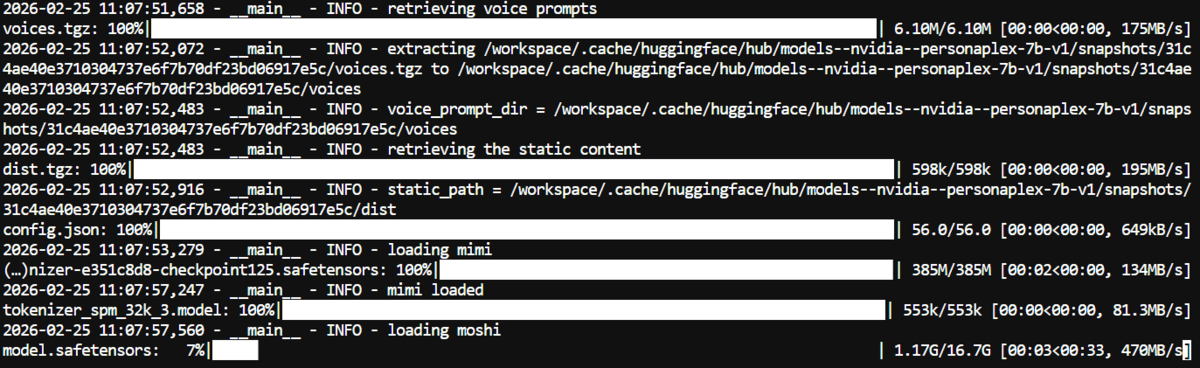
Once the download completes, the model is loaded into memory and the server starts.

Step 5: Talk to PersonaPlex in the browser
With the server running, the web interface can be opened by pasting the local server link into a browser. After the page loads, a conversation is started by choosing a voice, clicking add, granting microphone permission, and beginning to speak.
The interface includes conversation templates that set the assistant’s persona; for the demonstration an “astronaut” template was selected to make the exchange more playful, but a custom personality can be defined by editing the initial system prompt. A different voice can be chosen as well, since PersonaPlex supports both text-based role prompts and audio-based voice conditioning.


Limitations and what to watch
Running PersonaPlex locally has real hardware requirements: the model is around 7 billion parameters and the download alone is roughly 16.7 GB, so a capable GPU and sufficient disk space are needed, and performance will vary with the machine. The model is gated and distributed under the NVIDIA Open Model License, whose terms should be reviewed before any use beyond experimentation. As a generative speech model it can still produce inaccurate or inappropriate responses, and persona prompts shape but do not guarantee behavior, so outputs should not be treated as authoritative. Full-duplex conversation also remains an emerging capability, and latency or audio glitches can occur depending on the setup.
Concluding remarks
After completing the setup and holding a real-time conversation, the difference from chat-based AI is clear. Text chat is turn-based and transactional: type, wait, respond. Speech-to-speech changes that dynamic — there is no need to wait a turn, a question can be interrupted, the direction can change mid-sentence, and follow-ups feel natural. Running locally, the experience stays private and free of per-call costs, which makes a strong case that real-time, full-duplex speech is an important direction for conversational AI.
