
Author(s): Ritesh Meena
Originally published on Towards AI.
Part 2: Drop the theory. Here’s what we actually created.
A technical deep dive into the architecture made our development workflow 10x faster
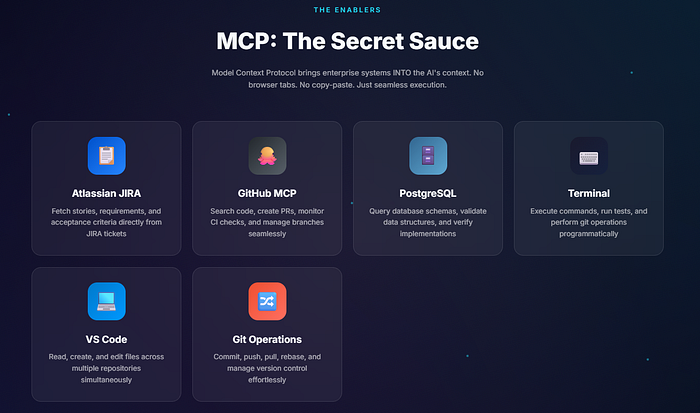
We added an AI coding agent to 5 MCP Server This gave it real-time access to:
- Our GitHub repository (read files, create PR, monitor CI)
- Our PostgreSQL database (query schema, valid data)
- Our JIRA/Atlassian Workspace (get stories, read acceptance criteria)
- Our file system (read/write local files)
- Web Fetching (Documentation, API Reference)
The result: an AI that doesn’t guess. it Asks questions, verifies and acts With full context.
mcp architecture

mcp server configuration
here is our real mcp.json layout:
{
"mcpServers": {
"github": {
"command": "npx",
"args": ("-y", "@modelcontextprotocol/server-github"),
"env": {
"GITHUB_PERSONAL_ACCESS_TOKEN": "${GITHUB_PAT}"
}
},
"postgres": {
"command": "npx",
"args": ("-y", "@modelcontextprotocol/server-postgres"),
"env": {
"POSTGRES_CONNECTION_STRING": "postgresql://user:pass@host:5432/db"
}
},
"atlassian": {
"command": "npx",
"args": ("-y", "@anthropic/mcp-atlassian"),
"env": {
"ATLASSIAN_SITE_URL": "https://your-org.atlassian.net",
"ATLASSIAN_USER_EMAIL": "${ATLASSIAN_EMAIL}",
"ATLASSIAN_API_TOKEN": "${ATLASSIAN_TOKEN}"
}
},
"fetch": {
"command": "npx",
"args": ("-y", "@anthropic/mcp-fetch")
}
}
}
What does each MCP server offer
1. GitHub MCP Server
Equipment available:
mcp_github_get_file_contents → Read any file from any repo
mcp_github_search_code → Search across repositories
mcp_github_create_pull_request → Create PRs programmatically
mcp_github_list_commits → Get commit history
mcp_github_push_files → Push changes to branches
mcp_github_create_branch → Create feature branches
Actual use – fetching a file, creating a PR
Agent: "I need to see the existing query builder pattern"Tool Call: mcp_github_get_file_contents
owner: "your-org"
repo: "backend-service"
path: "src/dao/QueryBuilder.java"Returns
: Full file contents (not a summary, actual code)Tool Call: mcp_github_create_pull_request
owner: "your-org"
repo: "backend-service"
title: "JIRA-1234 Add export feature"
body: "## Changesn- Added ExportServicen- Added unit tests"
head: "feature/JIRA-1234-export"
base: "master"Returns: PR URL, PR number
2. PostgreSQL MCP Server
Equipment available:
mcp_postgres_query → Execute read-only SQL queries
3. Atlassian MCP Server
Equipment available:
mcp_atlassian_getJiraIssue → Fetch full JIRA ticket
mcp_atlassian_searchJiraIssuesUsingJql → Search with JQL
mcp_atlassian_getConfluencePage → Fetch documentation
mcp_atlassian_addCommentToJiraIssue → Update tickets
Complete workflow (with actual tool calls)
Step 1: Get the Requirements
User: "Implement PROJ-1234"Agent executes:
├── mcp_atlassian_getJiraIssue("PROJ-1234")
│ └── Returns: Full ticket with acceptance criteria
│
├── mcp_github_search_code("similar feature keyword")
│ └── Returns: 3 matching files in repo
│
└── mcp_github_get_file_contents(matching_file_path)
└── Returns: Actual implementation to follow as pattern
Step 2: Understand the current schema
Agent executes:
├── mcp_postgres_query("SELECT * FROM information_schema.tables WHERE...")
│ └── Returns: All relevant tables
│
└── mcp_postgres_query("SELECT column_name, data_type FROM...")
└── Returns: Exact column definitions (no guessing)
Step 3: Implementation
Agent executes:
├── read_file(local pattern file) # Native filesystem tool
├── create_file(new_service.java) # Native filesystem tool
├── create_file(new_service_test.java) # Native filesystem tool
└── run_in_terminal("mvn test") # Verify tests pass
Step 4: Create PR and Monitor CI
Agent executes:
├── run_in_terminal("git add -A && git commit -m 'PROJ-1234 Add feature'")
├── run_in_terminal("git push origin feature/PROJ-1234")
│
├── mcp_github_create_pull_request(...)
│ └── Returns: PR #507 created
│
└── Loop until CI passes:
├── run_in_terminal("Invoke-RestMethod .../check-runs")
│ └── Returns: { status: "completed", conclusion: "failure" }
│
├── Agent reads failure logs
├── Agent fixes code
├── run_in_terminal("git push")
└── Repeat check
CI monitoring script (the agent runs it)
# Agent polls GitHub API for check status
$headers = @{
"Authorization" = "Bearer $env:GITHUB_PAT"
"Accept" = "application/vnd.github+json"
}$response = Invoke-RestMethod `
-Uri "https://api.github.com/repos/org/repo/commits/$SHA/check-runs" `
-Headers $headers
$response.check_runs | Select-Object name, status, conclusion
# Output:
# name status conclusion
# ---- ------ ----------
# SonarQube completed failure
# Unit Tests completed success
# Security Scan completed success
When SonarQube fails, the agent:
- fetches task log
- Analyzes violations
- fixes them in the code
- pushes again
- double checks
This loop is completely automatic.
Real results with real numbers

TL;DR
- mcp server Give AI agents real-time access to your systems
- GitHub MCP → Read code, create PR, monitor CI
- postgres mcp → Validate query schema, data
- Atlassian MCP → Get JIRA ticket, read confluence
- agent knowledge file → pattern, railing, reference
- Result: AI that doesn’t guess – it inquires, verifies, acts
Context switching is now eliminated thanks to AI Is Context.
Full MCP Documentation: https://modelcontextprotocol.io
GitHub MCP Server: https://github.com/modelcontextprotocol/servers
About the author
Building AI-powered development workflows. Currently everything is connecting to the MCP server ❤️
Published via Towards AI
