
Spatial data processing is central to geospatial workloads on Databricks. Many teams have historically relied on external libraries or Spark extensions — Apache Sedona, GeoPandas, or the Databricks Labs Mosaic project — to handle these workloads. Those approaches work, but they add operational overhead and often need careful tuning to reach acceptable performance. Databricks’ built-in Spatial SQL, introduced earlier in 2025, now includes roughly 90 spatial functions along with native GEOMETRY and GEOGRAPHY column types, removing the main pain points of add-on libraries: it is stable, fast, and — with Databricks SQL Serverless — requires no cluster, library-compatibility, or runtime management.
Spatial joins up to 17x faster
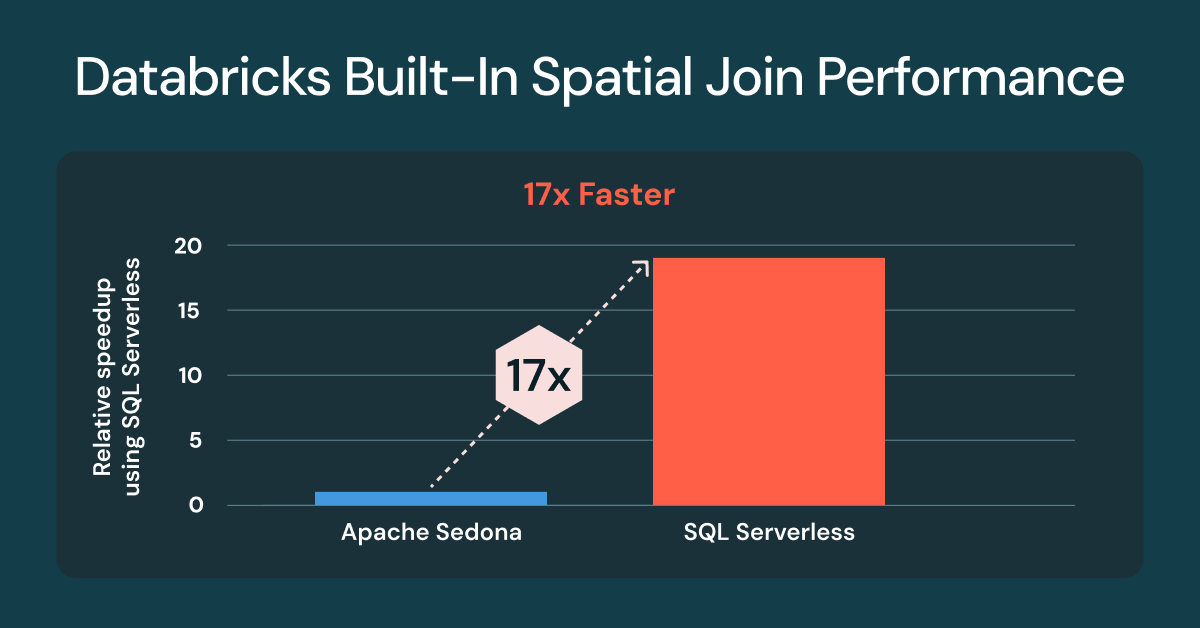
One of the most common spatial tasks is comparing whether two geometries overlap, whether one contains the other, or how close they are — the job of a spatial join. According to Databricks’ announcement, customers using built-in Spatial SQL for spatial joins now see up to 17 times faster performance compared with a classic cluster running Apache Sedona. The improvements are available on Databricks SQL Serverless and on classic clusters with Databricks Runtime (DBR) 17.3. Teams already using built-in spatial predicates such as ST_Intersects or ST_Contains need no code changes.
At the time of the benchmark Apache Sedona 1.7 was not compatible with DBR 17.x, DBR 16.4 was used.
Spatial joins are hard to make fast because geospatial data is heterogeneous: dense urban areas sit next to sparse rural ones, and geometric complexity varies enormously. Databricks attributes the gains to automatic techniques — spatial indexing, an optimized spatial join in the Photon engine, and intelligent range-join optimization — applied without user intervention. The developer writes standard SQL with spatial functions; the engine handles the complexity.
Why spatial joins matter to the business
A spatial join is like a database join, except that instead of matching IDs it uses a spatial predicate — overlap, containment, proximity — to link records by location. That makes it the workhorse of location analytics, powering aggregation and pattern discovery at every scale from a shopping centre or a farm to a city or the planet.
The benchmark
Databricks benchmarked against four worldwide large-scale datasets from the Overture Maps Foundation: addresses, buildings, land use, and streets. The datasets were downloaded as GeoParquet; for the Databricks runs, the Parquet WKB columns were converted to native GEOMETRY types in Lakehouse tables, while the Sedona runs used the same data prepared for Sedona’s expected layout.
Three queries were tested. The first, ST_Contains(buildings, addresses), is a point-in-polygon join of roughly 2.5 billion building polygons against 450 million address points, producing over 200 million matches (for Sedona this was expressed as ST_Within to exploit its default build-side optimization). The second, ST_Covers(landuse, buildings), evaluates about 1.3 million industrial land-use polygons covering the 2.5 billion buildings, yielding more than 25 million matches. The third, ST_Intersects(roads, landuse), joins roughly 300 million road segments against 10 million residential land-use polygons, returning over 100 million matches.
What’s next for Spatial SQL
Databricks continues to add spatial expressions based on customer demand. Functions added since the public preview include ST_AsEWKB, ST_Dump, ST_ExteriorRing, ST_InteriorRingN, and ST_NumInteriorRings. The DBR 18.0 beta adds ST_Azimuth, ST_Boundary, and ST_ClosestPoint, EWKT support including ST_GeogFromEWKT and ST_GeomFromEWKT, and performance and robustness improvements to ST_IsValid, ST_MakeLine, and ST_MakePolygon.
Limitations and what to watch
Vendor benchmarks deserve the usual caution. The 17x figure is a best case (“up to”), and the comparison ran Sedona on DBR 16.4 because Sedona 1.7 was not compatible with DBR 17.x at benchmark time — so the comparison spans different runtime versions. The Apache Sedona project has since published its own benchmarking commentary, and teams with heavy geospatial workloads should test on their own data and query shapes. Native Spatial SQL also ties workloads more closely to the Databricks platform, a trade-off against portable open-source libraries worth weighing for multi-cloud or migration-sensitive architectures. Related reading on this site: modernizing data engineering with Lakeflow on Azure Databricks and emerging trends in data engineering for 2026.
