
Building custom foundation models requires coordination of multiple assets across the development lifecycle, such as data assets, compute infrastructure, model architectures and frameworks, lineage, and production deployment. Data scientists create and refine training datasets, develop custom evaluators to assess the quality and safety of models, and iterate through fine-tuning configurations to optimize performance. As these workflows scale across teams and environments, it becomes challenging to track the specific dataset versions, evaluator configurations, and hyperparameters produced by each model. Teams often rely on manual documentation in notebooks or spreadsheets, making it difficult to reproduce successful experiments or understand the lineage of production models.
This challenge becomes acute in enterprise environments with multiple AWS accounts for development, staging, and production. As models move through deployment pipelines, significant coordination is required to maintain visibility into their training data, evaluation criteria, and configuration. Without automated tracking, teams lose the ability to track deployed models back to their origin or share assets consistently across experiments. Amazon SageMaker AI supports tracking and managing assets used in generative AI development. With Amazon SageMaker AI you can register and version models, datasets, and custom evaluators, then automatically capture relationships and lineage when fine-tuning, evaluating, and deploying generic AI models. This reduces manual tracking overhead and provides complete visibility of how models were built from base foundation model to production deployment.
In this post, we’ll explore new capabilities and key concepts that help organizations track and manage the model development and deployment lifecycle. We’ll show you how to configure the features to train models with automated end-to-end lineage, from dataset upload and versioning to model fine-tuning, evaluation, and seamless endpoint deployment.
Managing dataset versions across experiments
As you refine the training data for model optimization, you typically create multiple versions of the dataset. You can register datasets and create new versions as your data evolves, with each version being tracked independently. When you register a dataset in SageMaker AI, you provide S3 location and metadata describing the dataset. As you refine your data – whether adding more examples, improving quality, or making adjustments for specific use cases – you can create new versions of the same dataset. Each version, as shown in the following image, maintains its own metadata and S3 space so you can track the evolution of your training data over time.
When you use a dataset for fine-tuning, Amazon SageMaker AI automatically links the specific dataset version to the resulting model. It supports comparisons between models trained with different dataset versions and helps you understand which data refinements led to better performance. You can also reuse the same dataset version across multiple experiments for consistency when testing different hyperparameters or fine-tuning techniques.
Creating reusable custom evaluators
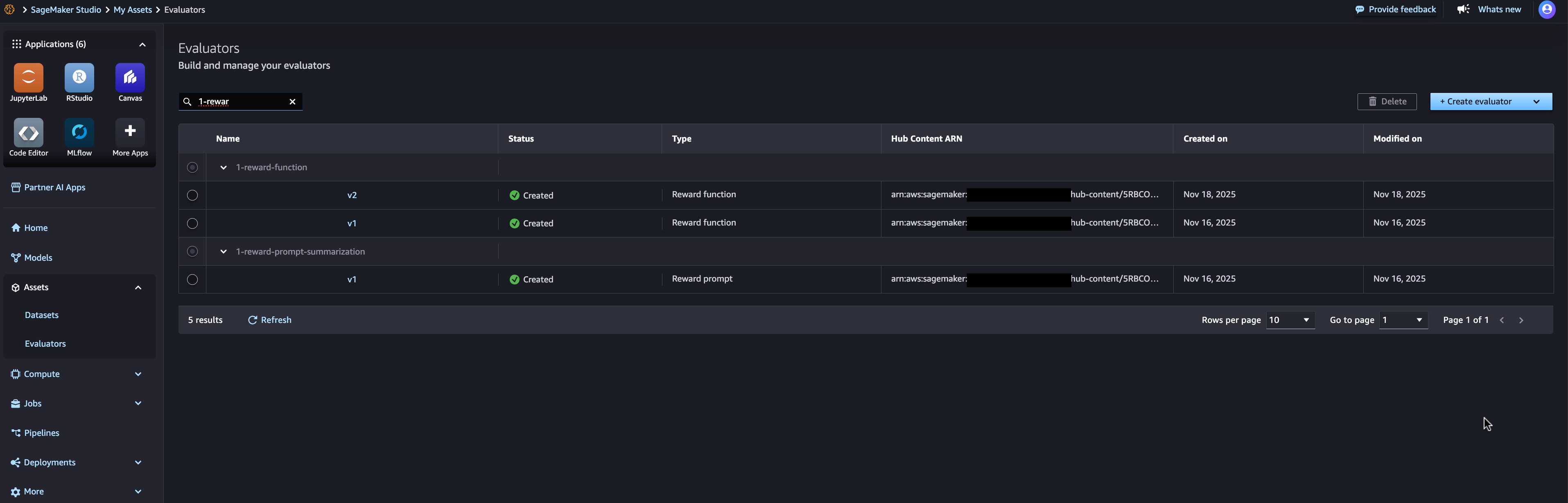
Evaluating custom models often requires domain-specific quality, security, or performance criteria. A custom evaluator contains Lambda function code that receives input data and returns evaluation results, including score and validation status. You can define evaluators for a variety of purposes – checking response quality, assessing safety and toxicity, validating the output format, or measuring task-specific accuracy. You can use AWS Lambda functions to track custom evaluators that implement your evaluation logic, then version and reuse these evaluators across models and datasets, as shown in the following image.
Automated lineage tracking throughout the development lifecycle
SageMaker AI lineage tracking capabilities automatically capture relationships between assets as you create and evaluate models. When you create a fine-tuning task, Amazon SageMaker connects the AI training task to the input dataset, base foundation model, and output model. When you run an evaluation job, it links the evaluation to the model being evaluated and the evaluators used. This automated lineage capture means you don’t need to manually document which assets were used for each experiment. You can see the complete lineage of a model, showing its base foundation model, training dataset with specific versions, hyperparameters, evaluation results and deployment location, as shown in the image below.
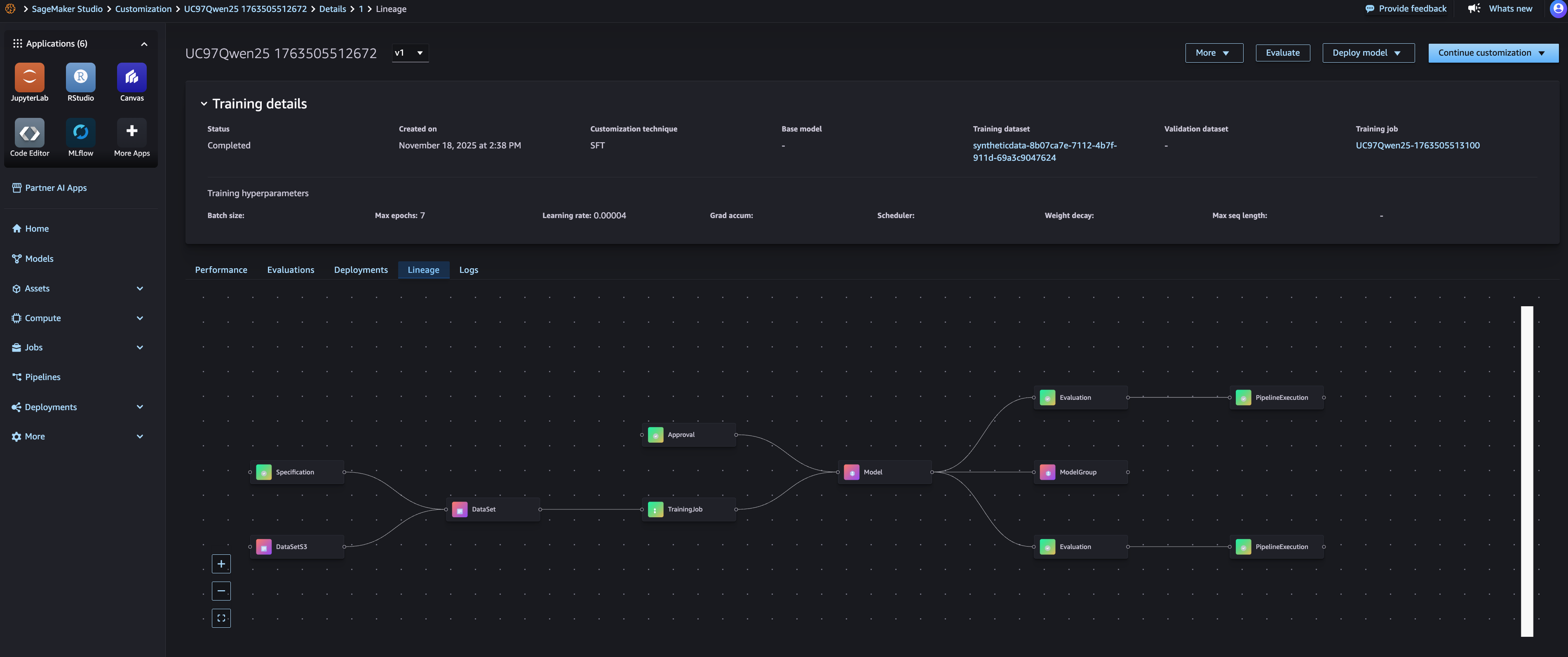
With Lineage View, you can trace any deployed models to their origins. For example, if you need to understand why a production model behaves a certain way, you can see exactly what training data, fine-tuning configuration, and evaluation criteria were used. This is particularly valuable for governance, reproducibility, and debugging purposes. You can also use the pedigree information to reproduce experiments. By identifying the exact dataset version, evaluator version, and configuration used for a successful model, you can recreate the training process with confidence that you are using the same inputs.
Integration with MLflow for experiment tracking
Amazon SageMaker AI’s model optimization capabilities are integrated by default with SageMaker AI MLFlow apps, providing automatic linking between model training jobs and MLFlow experiments. When you run a model optimization task, all necessary MLFlow actions are automatically performed for you – the default SageMaker AI MLFlow app is automatically used, an MLFlow experiment is selected for you and all metrics, parameters and artifacts are logged for you. From the SageMaker AI Studio model page, you will be able to view the metrics obtained from the MLflow (as shown in the following image) and further view the full metrics within the corresponding MLflow experiment.
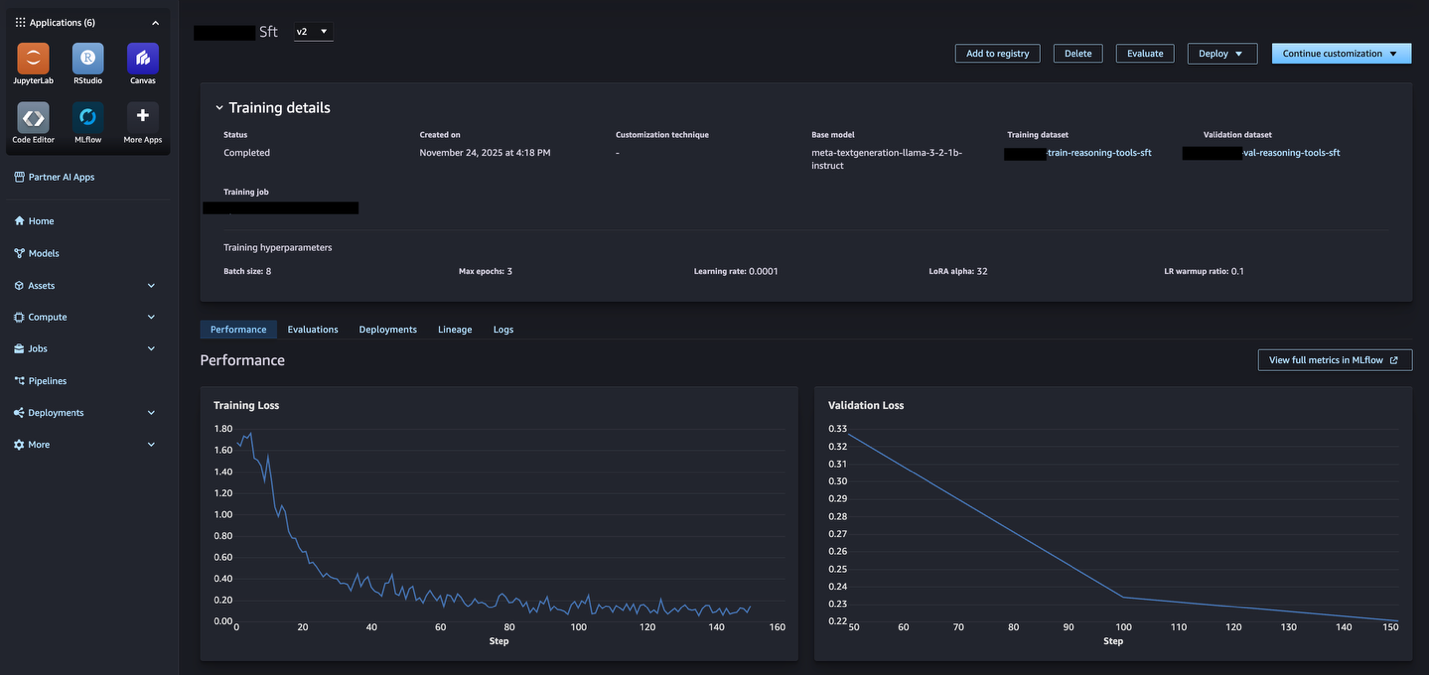
Comparing multiple model candidates is straightforward with MLflow integration. You can use MLflow to visualize performance metrics across all experiments, identify the best performing model, then use lineage tracing to understand which specific datasets and evaluators produced that result. This helps you make informed decisions about which model to promote to boost production based on both quantitative metrics and asset provenance.
Getting started with tracking and managing generic AI assets
By bringing together these various model optimization assets and processes – dataset versioning, evaluator tracking, model performance, model deployment – you can transform scattered model assets into a traceable, reproducible, and production-ready workflow with automated end-to-end lineage. This capability is now available in supported AWS regions. You can access this capability through Amazon SageMaker AI Studio and SageMaker Python SDK,
Getting Started:
- Open and navigate to Amazon SageMaker AI Studio model Section.
- Jumpstart Customize the base model to build the model.
- navigate to Property Section to manage datasets and evaluators.
- Register your first dataset by providing S3 location and metadata.
- Create a custom evaluator using an existing Lambda function or create a new one.
- Use registered datasets in your fine-tuning tasks – lineage is captured automatically.
- View the model’s lineage to see complete relationships.
For more information, visit the Amazon SageMaker AI documentation.
About the authors
 Amit Modi Sagemaker AI is the product leader for MLOps, ML governance, and inference in AWS. With over a decade of B2B experience, he builds scalable products and teams that drive innovation and deliver value to customers globally.
 Sandeep Ravish GenAI Specialist Solutions Architect at AWS. He works with customers through their AIOps journey to scale GenAI applications such as model training, agents, and GenAI use-cases. He also focuses on go-to-market strategies that help AWS build and align products to solve industry challenges in the generic AI space. You can contact Sandeep Linkedin To learn about GenAI solutions.
