

Introduction
Synthetic data is created artificially rather than collected from the real world. It resembles real data while avoiding privacy concerns and the cost of collection, which makes it useful for testing software and models and for simulating how a system might behave after release. Dedicated libraries such as Faker, SDV (the Synthetic Data Vault), and synthcity exist for this purpose, and large language models are increasingly used to generate synthetic data as well.
The focus here is deliberately different: building small Python scripts by hand instead of relying on those libraries or AI tools. Writing the generators directly gives a clearer understanding of how to shape a dataset and how to introduce deliberate bias or errors for testing. The five scripts below start simple and build up; once the basics are clear, moving to specialized libraries is straightforward.
1. Generating simple random data
The easiest place to start is a flat table of independent random values — names, ages, categories, and similar fields generated one column at a time.
import csv
import random
from datetime import datetime, timedelta

random.seed(42)

countries = ("Canada", "UK", "UAE", "Germany", "USA")
plans = ("Free", "Basic", "Pro", "Enterprise")

def random_signup_date():
    start = datetime(2024, 1, 1)
    end = datetime(2026, 1, 1)
    delta_days = (end - start).days
    return (start + timedelta(days=random.randint(0, delta_days))).date().isoformat()

rows = ()
for i in range(1, 1001):
    age = random.randint(18, 70)
    country = random.choice(countries)
    plan = random.choice(plans)
    monthly_spend = round(random.uniform(0, 500), 2)

    rows.append({
        "customer_id": f"CUST{i:05d}",
        "age": age,
        "country": country,
        "plan": plan,
        "monthly_spend": monthly_spend,
        "signup_date": random_signup_date()
    })

with open("customers.csv", "w", newline="", encoding="utf-8") as f:
    writer = csv.DictWriter(f, fieldnames=rows(0).keys())
    writer.writeheader()
    writer.writerows(rows)

print("Saved customers.csv")
Output:
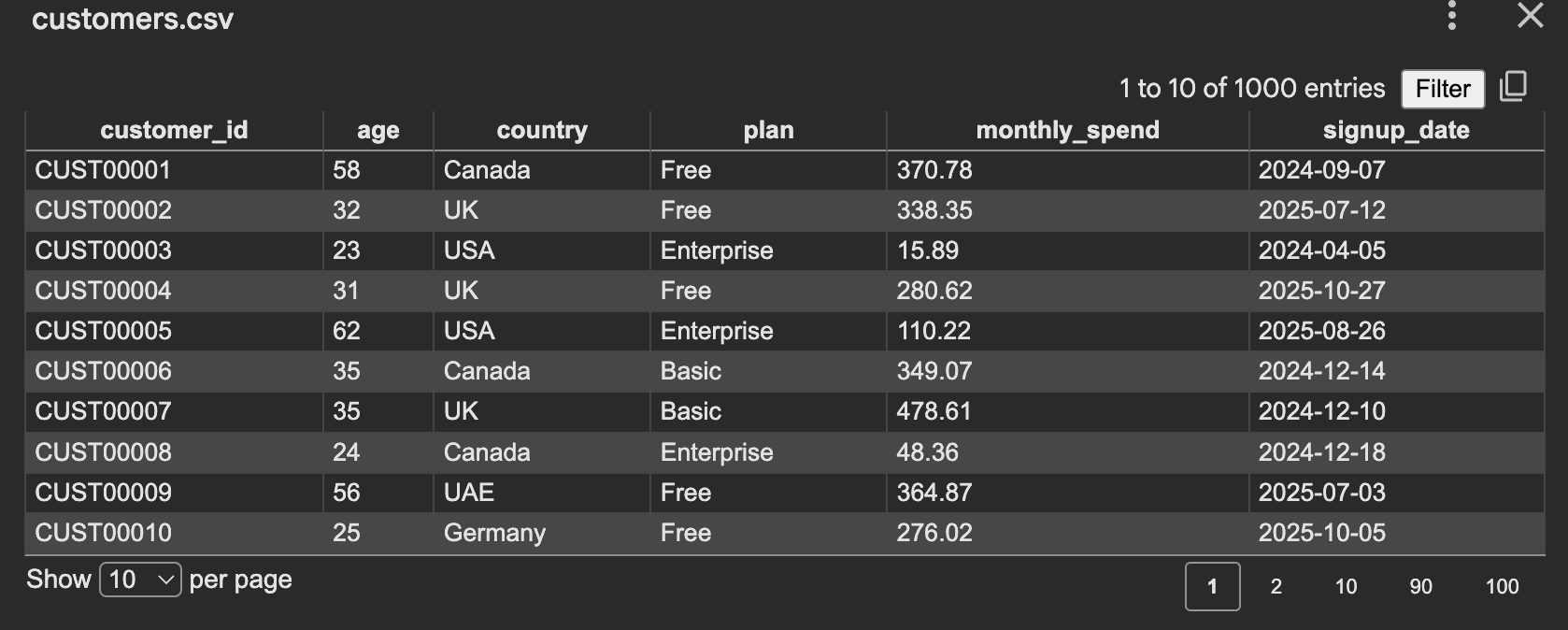
In real-world data, values rarely behave independently. Fields tend to be correlated, so the next step is to generate them together rather than in isolation.
import csv
import random

random.seed(42)

plans = ("Free", "Basic", "Pro", "Enterprise")

def choose_plan():
    roll = random.random()
    if roll < 0.45:
        return "Free"
    if roll < 0.75:
        return "Basic"
    if roll < 0.93:
        return "Pro"
    return "Enterprise"

def generate_spend(age, plan):
    if plan == "Free":
        base = random.uniform(0, 10)
    elif plan == "Basic":
        base = random.uniform(10, 60)
    elif plan == "Pro":
        base = random.uniform(50, 180)
    else:
        base = random.uniform(150, 500)

    if age >= 40:
        base *= 1.15

    return round(base, 2)

rows = ()
for i in range(1, 1001):
    age = random.randint(18, 70)
    plan = choose_plan()
    spend = generate_spend(age, plan)

    rows.append({
        "customer_id": f"CUST{i:05d}",
        "age": age,
        "plan": plan,
        "monthly_spend": spend
    })

with open("controlled_customers.csv", "w", newline="", encoding="utf-8") as f:
    writer = csv.DictWriter(f, fieldnames=rows(0).keys())
    writer.writeheader()
    writer.writerows(rows)

print("Saved controlled_customers.csv")
Output:
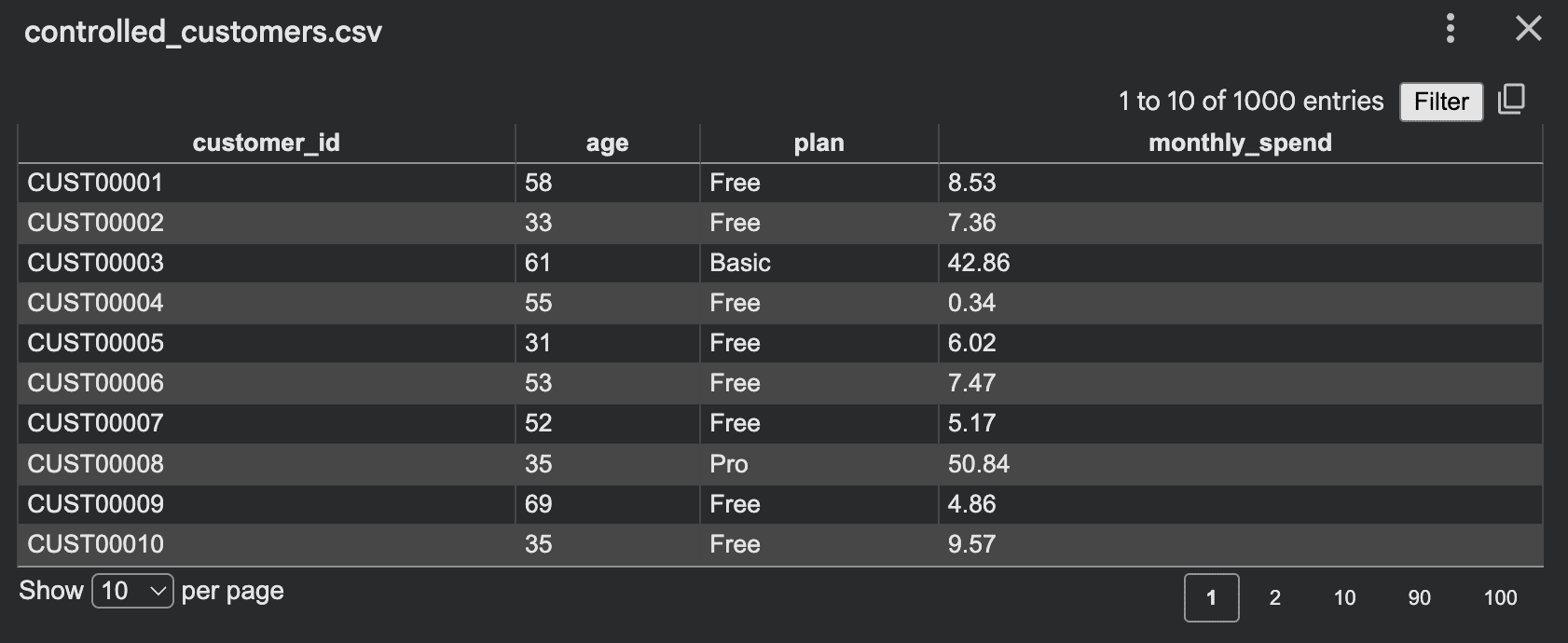
Now the dataset preserves meaningful patterns instead of producing pure noise, because related fields are generated with their dependencies in mind.
2. Simulating a process
Simulation-based generation is one of the most effective ways to produce realistic datasets. Rather than filling columns directly, the script simulates a process — for example, a small warehouse where orders arrive, stock runs low, and low stock triggers backorders.
import csv
import random
from datetime import datetime, timedelta

random.seed(42)

inventory = {
    "A": 120,
    "B": 80,
    "C": 50
}

rows = ()
current_time = datetime(2026, 1, 1)

for day in range(30):
    for product in inventory:
        daily_orders = random.randint(0, 12)

        for _ in range(daily_orders):
            qty = random.randint(1, 5)
            before = inventory(product)

            if inventory(product) >= qty:
                inventory(product) -= qty
                status = "fulfilled"
            else:
                status = "backorder"

            rows.append({
                "time": current_time.isoformat(),
                "product": product,
                "qty": qty,
                "stock_before": before,
                "stock_after": inventory(product),
                "status": status
            })

        if inventory(product) < 20:
            restock = random.randint(30, 80)
            inventory(product) += restock
            rows.append({
                "time": current_time.isoformat(),
                "product": product,
                "qty": restock,
                "stock_before": inventory(product) - restock,
                "stock_after": inventory(product),
                "status": "restock"
            })

    current_time += timedelta(days=1)

with open("warehouse_sim.csv", "w", newline="", encoding="utf-8") as f:
    writer = csv.DictWriter(f, fieldnames=rows(0).keys())
    writer.writeheader()
    writer.writerows(rows)

print("Saved warehouse_sim.csv")
Output:
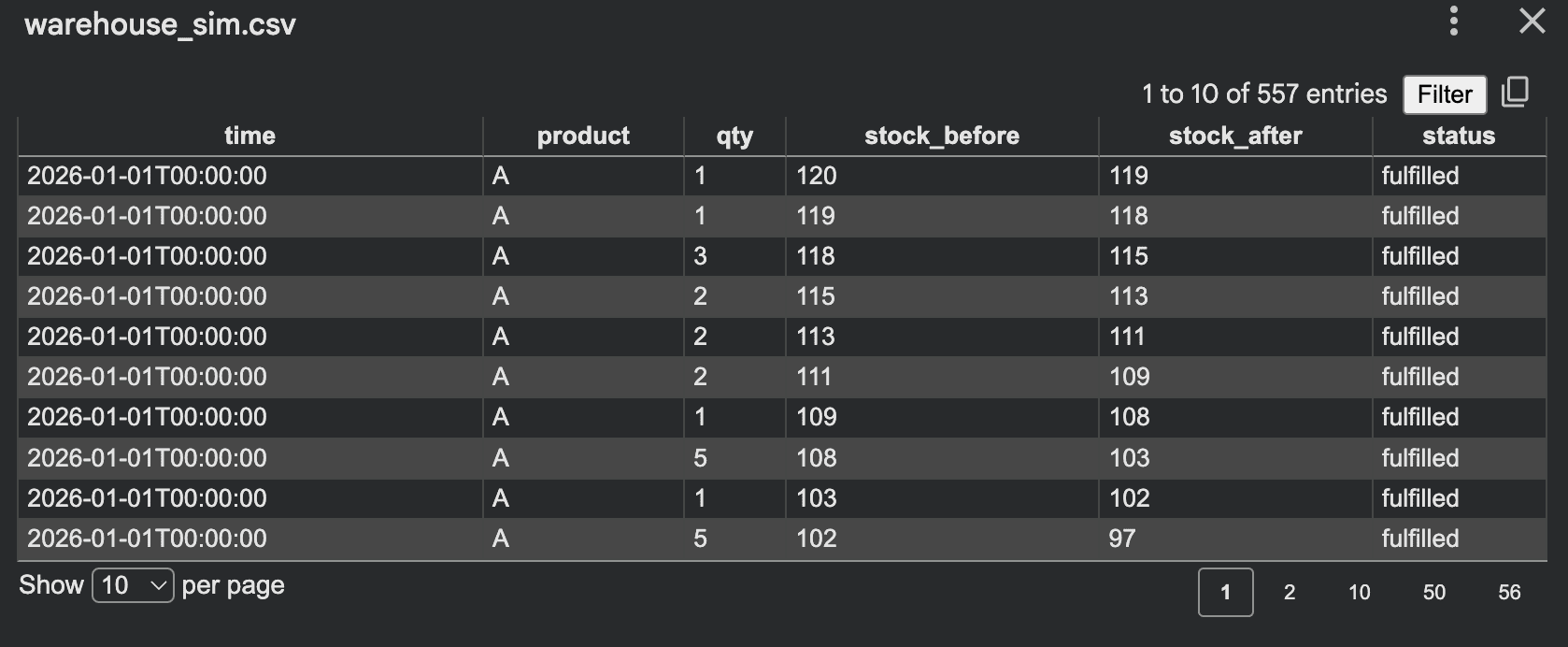
This approach works well because the data emerges as a byproduct of system behavior, which generally yields more realistic relationships than generating rows at random.
3. Generating time-series data
Synthetic data is not limited to static tables. Many systems produce sequences over time, such as app traffic, sensor readings, orders per hour, or server response times. The script below generates hourly website visits with weekday patterns.
import csv
import random
from datetime import datetime, timedelta

random.seed(42)

start = datetime(2026, 1, 1, 0, 0, 0)
hours = 24 * 30
rows = ()

for i in range(hours):
    ts = start + timedelta(hours=i)
    weekday = ts.weekday()

    base = 120
    if weekday >= 5:
        base = 80

    hour = ts.hour
    if 8 <= hour <= 11:
        base += 60
    elif 18 <= hour <= 21:
        base += 40
    elif 0 <= hour <= 5:
        base -= 30

    visits = max(0, int(random.gauss(base, 15)))

    rows.append({
        "timestamp": ts.isoformat(),
        "visits": visits
    })

with open("traffic_timeseries.csv", "w", newline="", encoding="utf-8") as f:
    writer = csv.DictWriter(f, fieldnames=("timestamp", "visits"))
    writer.writeheader()
    writer.writerows(rows)

print("Saved traffic_timeseries.csv")
Output:
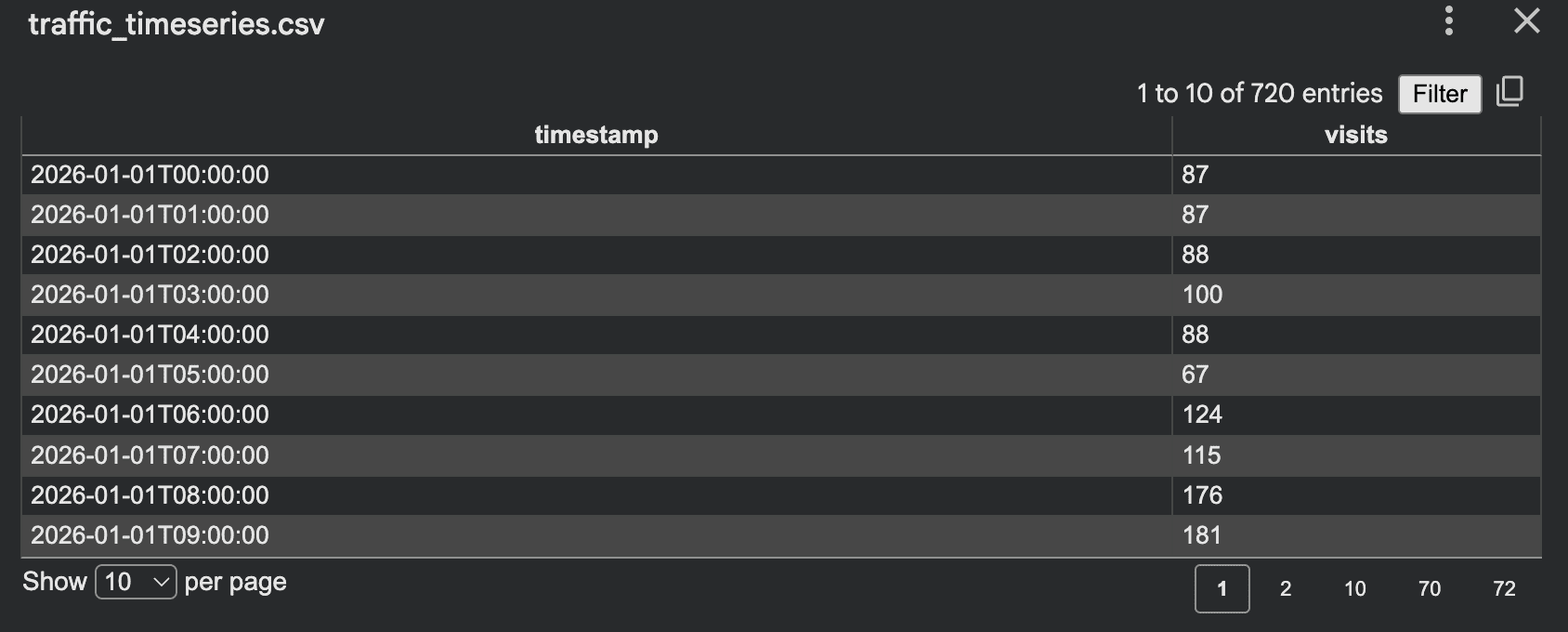
It works well because it combines trends, random noise, and cyclical behavior, which together resemble how real time-series data fluctuates.
4. Creating an event log
Event logs are another useful pattern, well suited to product analytics and workflow testing. Instead of one row per customer, the script produces one row per action.
import csv
import random
from datetime import datetime, timedelta

random.seed(42)

events = ("signup", "login", "view_page", "add_to_cart", "purchase", "logout")

rows = ()
start = datetime(2026, 1, 1)

for user_id in range(1, 201):
    event_count = random.randint(5, 30)
    current_time = start + timedelta(days=random.randint(0, 10))

    for _ in range(event_count):
        event = random.choice(events)

        if event == "purchase" and random.random() < 0.6:
            value = round(random.uniform(10, 300), 2)
        else:
            value = 0.0

        rows.append({
            "user_id": f"USER{user_id:04d}",
            "event_time": current_time.isoformat(),
            "event_name": event,
            "event_value": value
        })

        current_time += timedelta(minutes=random.randint(1, 180))

with open("event_log.csv", "w", newline="", encoding="utf-8") as f:
    writer = csv.DictWriter(f, fieldnames=rows(0).keys())
    writer.writeheader()
    writer.writerows(rows)

print("Saved event_log.csv")
Output:
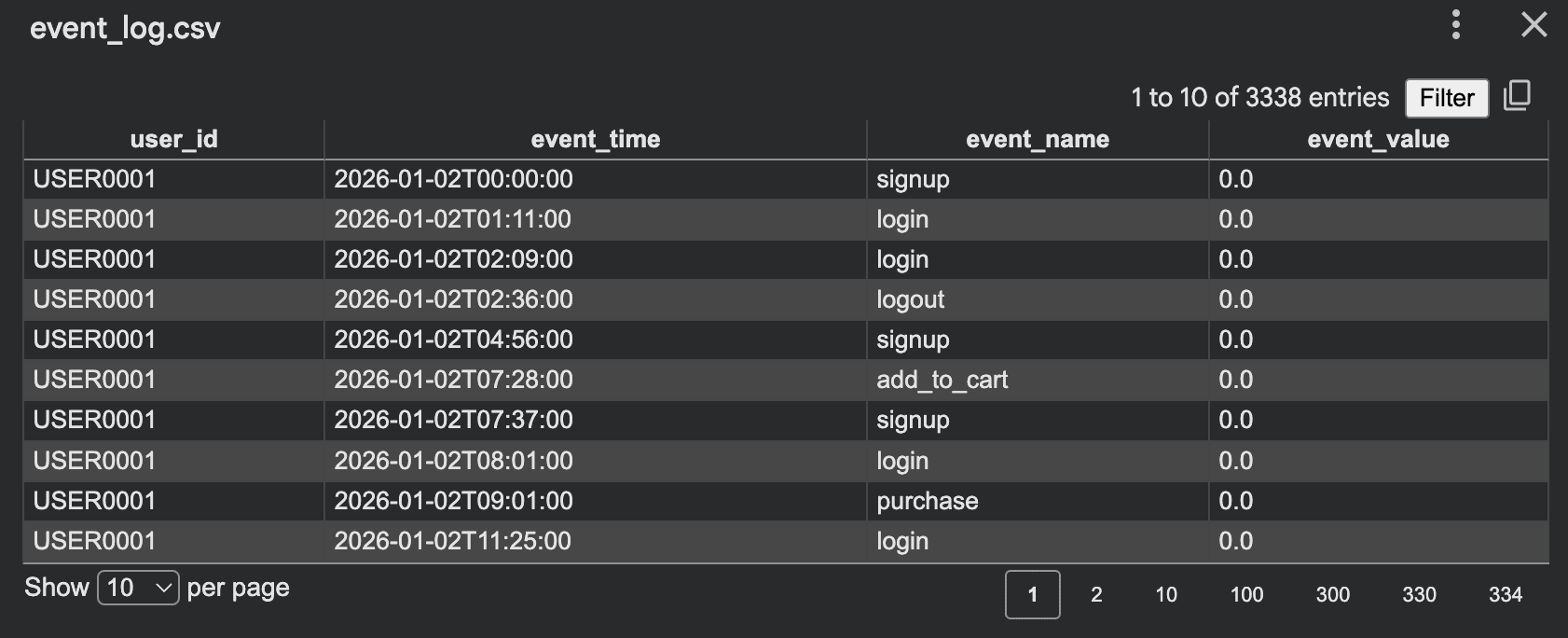
This format supports funnel analysis, analytics-pipeline testing, business-intelligence dashboards, session reconstruction, and anomaly-detection experiments. Making each event depend on the previous one produces more realistic sequences.
5. Generating synthetic text with templates
Synthetic data is also valuable for natural language processing. An LLM is not always necessary to get started; effective text datasets can be built from templates and controlled variations — for instance, support-ticket data for training a classifier.
import json
import random

random.seed(42)

issues = (
    ("billing", "I was charged twice for my subscription"),
    ("login", "I cannot log into my account"),
    ("shipping", "My order has not arrived yet"),
    ("refund", "I want to request a refund"),
)

tones = ("Please help", "This is urgent", "Can you check this", "I need support")

records = ()

for _ in range(100):
    label, message = random.choice(issues)
    tone = random.choice(tones)

    text = f"{tone}. {message}."
    records.append({
        "text": text,
        "label": label
    })

with open("support_tickets.jsonl", "w", encoding="utf-8") as f:
    for item in records:
        f.write(json.dumps(item) + "n")

print("Saved support_tickets.jsonl")
Output:
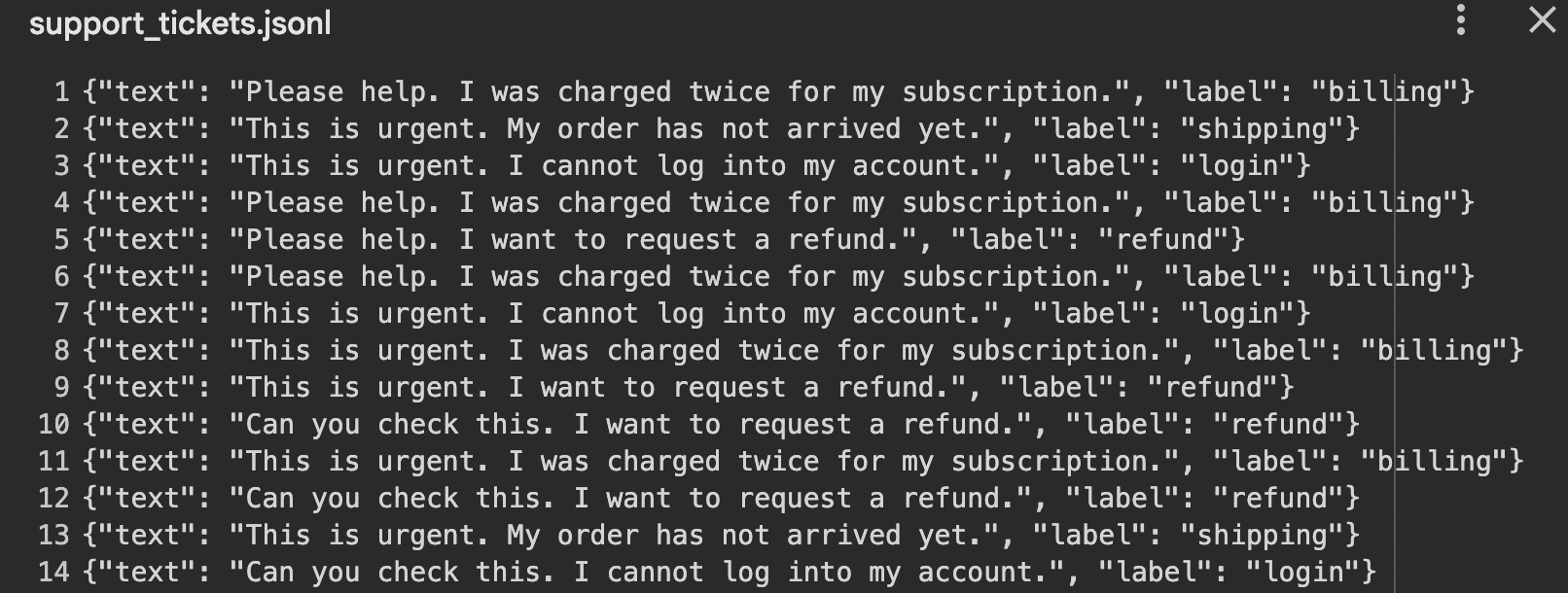
Template-based text works well for classification demos, intent detection, and chatbot testing, where the structure of the language matters more than its novelty.
Common mistakes and what to watch
Synthetic-data scripts are powerful but easy to misuse. Common mistakes include randomizing every value with equal weight, ignoring dependencies between fields, generating values that violate business logic, and assuming synthetic data is secure by default. It is also a mistake to create data that is too clean to exercise real-world edge cases, or to reuse the same patterns so heavily that the dataset becomes predictable and unrealistic.
Privacy deserves particular care. Synthetic data reduces exposure to real records, but it is not automatically risk-free: if a generator is fitted too closely to sensitive source data, it can inadvertently leak information about the originals. The safest approach is to validate that synthetic outputs preserve the statistical properties needed for a task without reproducing identifiable records, and to treat hand-written generators as a foundation before graduating to dedicated libraries such as SDV or synthcity for more demanding work.
