

Serving machine learning models at high queries per second (QPS) is one of the harder problems in production ML. Users expect instant feedback on every interaction, whether that is a recommendation delivered in milliseconds, a fraudulent charge blocked before it clears, or a search result that feels immediate. Delivering those experiences at scale depends on model serving systems that stay fast, stable and predictable under constant and uneven load. This article explains how Databricks Model Serving supports real-time, high-QPS workloads and outlines practical steps for achieving low latency, high throughput and predictable cost.
Why high-QPS serving is difficult
As traffic grows to tens or hundreds of thousands of requests per second, teams tend to hit the same walls. Latency becomes inconsistent, infrastructure costs climb, and systems need constant tuning to absorb spikes and lulls in demand. Failures also get harder to diagnose as more components are chained together, which pulls engineers away from improving models and toward simply keeping production running.
Databricks positions Model Serving as a way to centralise features, training, MLOps through MLflow, deployment and real-time monitoring in one stack, with the stated goal of reducing operational complexity and speeding up deployment. Reported use cases include personalisation and recommendation workloads that require real-time responses at large scale.
Best practices for high-QPS performance
Once the platform foundation is in place, the next step is to optimise endpoints, models and client applications so throughput stays high and latency stays low as traffic increases.
Use route-optimized endpoints
An important first step is ensuring the network layer is tuned for high throughput and low latency. Enabling route optimization on an endpoint lets Databricks improve the network path and routing for inference requests, producing faster, more direct communication between the client and the model. This reduces the time a request takes to reach the model and is especially useful for latency-sensitive applications such as recommendations, search and fraud detection. Databricks recommends route optimization specifically for endpoints with high QPS and throughput requirements.
Optimize the model and the endpoint
In high-throughput scenarios, reducing model complexity, offloading work from the serving endpoint and setting the right concurrency targets all help an endpoint scale to larger request volumes efficiently. Smaller, less complex models generally infer faster and support higher QPS, so techniques such as quantization or pruning are worth considering for large models. Complex pre-processing and post-processing should be offloaded from the endpoint wherever possible, so the endpoint spends its time on the critical step of inference.
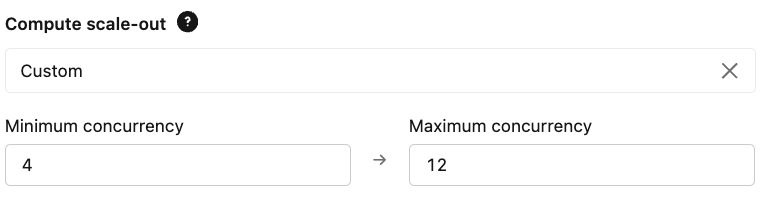
Provisioned concurrency should be configured to match expected QPS and latency requirements, sized to handle baseline load with headroom for peaks. A useful starting estimate is provisioned concurrency equal to queries per second multiplied by the model execution time in seconds, refined with load testing against measured latency.
Optimize client-side code
Efficient client-side code ensures requests are processed quickly and endpoint compute is fully used, which improves throughput and reduces cost. Reusing connections rather than opening a new one per request, issuing requests concurrently, and implementing retry logic with exponential backoff all help. Retry logic matters because Model Serving endpoints permit temporary queuing to absorb bursts, but once request rate or concurrency exceeds capacity beyond a defined threshold, the endpoint returns HTTP 429 (Too Many Requests) responses to protect stability. Clients that back off and retry gracefully handle those conditions without cascading failures.
Limitations and what to watch
These practices reduce latency and cost, but they do not remove the need for capacity planning. Provisioned concurrency reserves compute, so oversizing raises cost while undersizing causes queuing and 429 errors; the right setting depends on real traffic patterns and should be validated with load testing rather than assumed. Route optimization and specific concurrency behaviours can vary by cloud, region and endpoint type, and some capabilities may change as the platform evolves, so current documentation should be checked for a given deployment. Aggressive model compression such as quantization or pruning can trade accuracy for speed, and that trade-off needs to be measured on the actual task. Finally, benchmarks and vendor testimonials describe particular workloads and are not guarantees for a different model or traffic profile.
Used together, route optimization, model and endpoint tuning, and efficient client code let teams serve real-time models at scale while keeping latency and cost predictable. Teams building broader platforms on the same stack may also find it useful to review how Databricks system tables support operational observability and how to modernise a data engineering platform with Lakeflow. Full guidance is available in the Databricks production optimization documentation and the Databricks engineering blog.
