

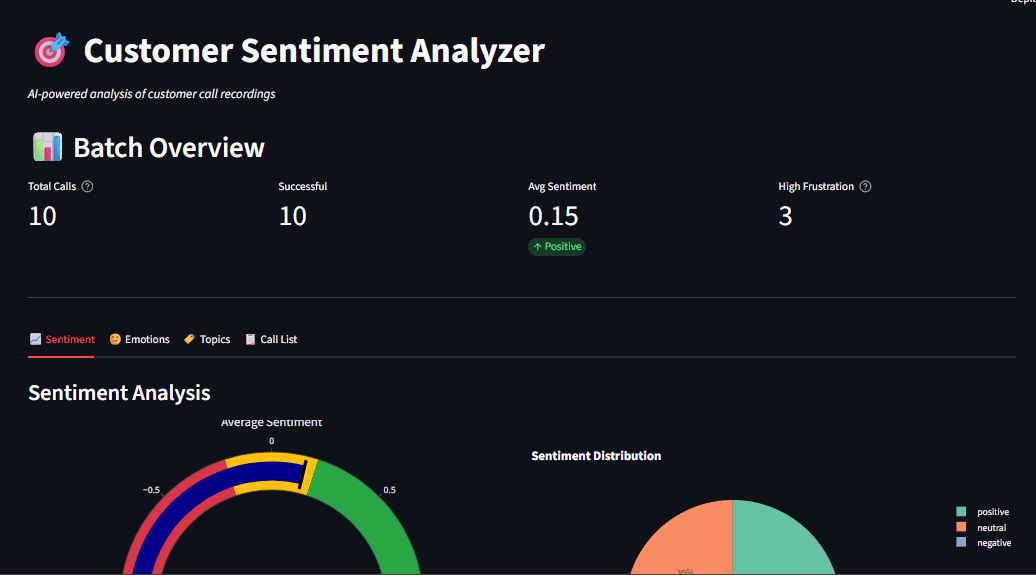
Customer service centres record thousands of conversations every day, and those audio files hold useful signals: whether customers are satisfied, which problems come up most often, and how sentiment shifts over the course of a call. Reviewing the recordings by hand is slow and inconsistent. Modern artificial intelligence (AI) makes it possible to automate customer call sentiment analysis end to end, transcribing calls, detecting sentiment, and surfacing recurring themes using open-source tools that run offline.
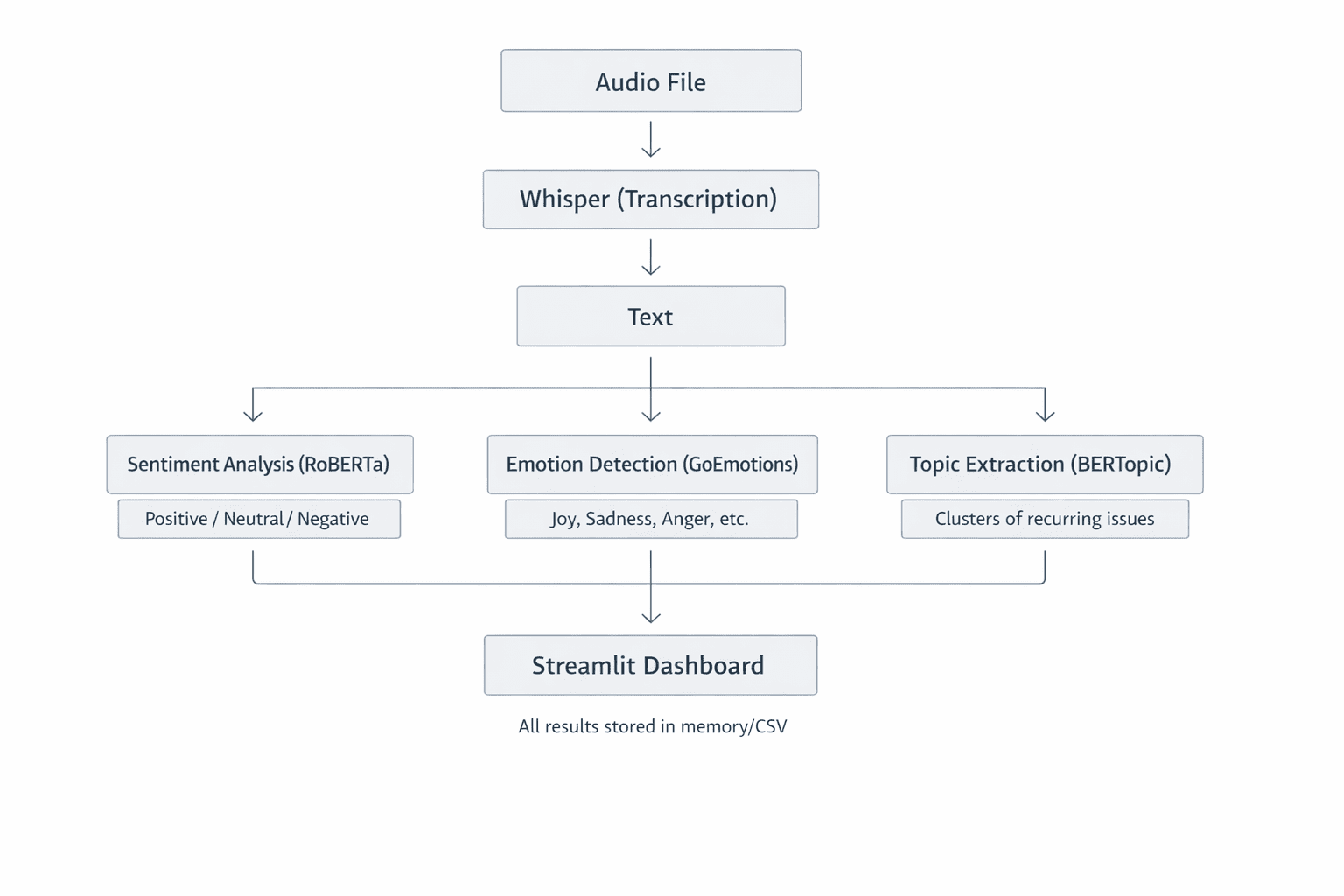
This walkthrough describes a complete customer sentiment analyzer that transcribes audio with Whisper, classifies sentiment and emotion, extracts topics with BERTopic, and presents the results in an interactive dashboard. Because every component runs locally, sensitive customer data never leaves the machine.
Why local AI matters for customer data
Running the pipeline on local, open-source models keeps recordings and transcripts on infrastructure the organisation controls, which simplifies compliance with privacy obligations and avoids sending personal data to third-party APIs. It also removes per-call usage costs and makes results reproducible.
Prerequisites
The project assumes a working Python environment and familiarity with installing packages. The main dependencies are an automatic speech recognition model, a transformer-based classifier, a topic-modelling library, and a dashboard framework.
Setting up the project
The setup step installs the required libraries and prepares the project structure.
git clone https://github.com/zenUnicorn/Customer-Sentiment-analyzer.gitpip install -r requirements.txt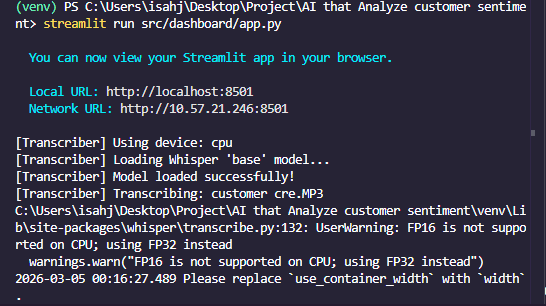
Transcribing audio with Whisper
The first stage converts each recording to text using Whisper, an automatic speech recognition (ASR) model from OpenAI (Whisper). Whisper is a transformer-based encoder-decoder model trained on about 680,000 hours of multilingual audio. Given an audio file, it resamples the audio to 16 kHz mono, produces a Mel spectrogram (a visual representation of frequencies over time), splits that spectrogram into 30-second windows, passes each window through an encoder, and decodes the result into text tokens one word or sub-word at a time. A Mel spectrogram is essentially how the model “sees” sound: time on the x-axis, frequency on the y-axis, and intensity for volume. The approach produces accurate transcripts even with background noise or varied accents.
import whisper

class AudioTranscriber:
    def __init__(self, model_size="base"):
        self.model = whisper.load_model(model_size)

    def transcribe_audio(self, audio_path):
        result = self.model.transcribe(
            str(audio_path),
            word_timestamps=True,
            condition_on_previous_text=True
        )
        return {
            "text": result("text"),
            "segments": result("segments"),
            "language": result("language")
}| Sample | parameters | pace | best for |
|---|---|---|---|
| Small | 39m | the fastest | quick test |
| Base | 74m | Fast | Development |
| Small | 244m | medium | Production |
| Big | 1550m | slow | maximum accuracy |
Sentiment analysis with transformers
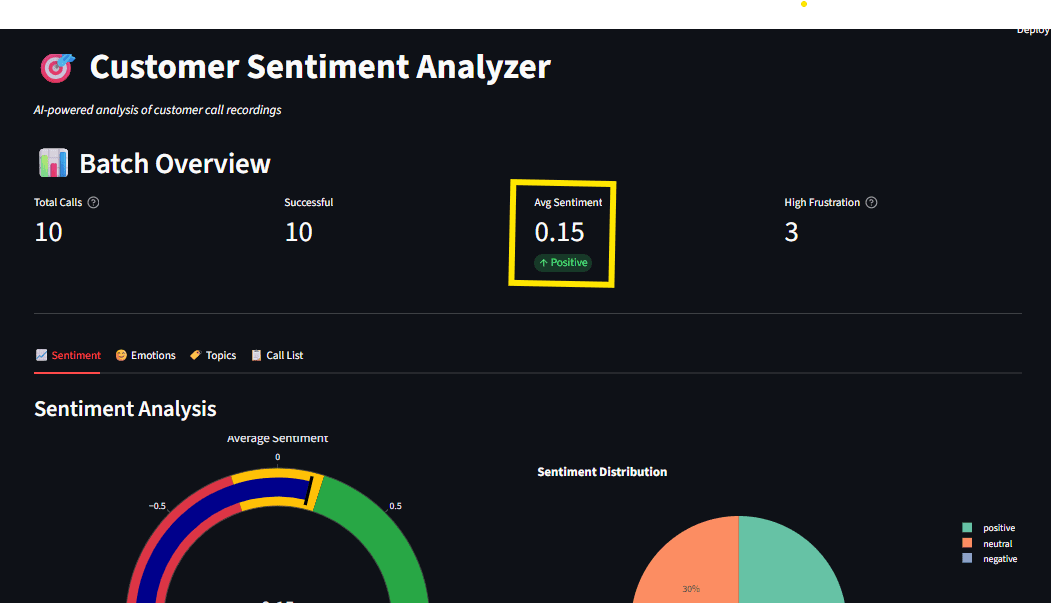
Sentiment classification labels each segment as positive, negative, or neutral, while a separate emotion pass can flag states such as frustration, satisfaction, or urgency. Using a pretrained transformer model captures context that simple keyword matching misses.
from transformers import AutoModelForSequenceClassification, AutoTokenizer
import torch.nn.functional as F

class SentimentAnalyzer:
    def __init__(self):
        model_name = "cardiffnlp/twitter-roberta-base-sentiment-latest"
        self.tokenizer = AutoTokenizer.from_pretrained(model_name)
        self.model = AutoModelForSequenceClassification.from_pretrained(model_name)

    def analyze(self, text):
        inputs = self.tokenizer(text, return_tensors="pt", truncation=True)
        outputs = self.model(**inputs)
        probabilities = F.softmax(outputs.logits, dim=1)

        labels = ("negative", "neutral", "positive")
        scores = {label: float(prob) for label, prob in zip(labels, probabilities(0))}

        return {
            "label": max(scores, key=scores.get),
            "scores": scores,
            "compound": scores("positive") - scores("negative")
        }
Why dictionary methods fall short
Dictionary or lexicon approaches score words in isolation and miss negation, sarcasm, and context, for example treating “not happy” as positive because it contains “happy.” A transformer model evaluates the whole sentence, which makes its judgements far more reliable on real conversations.
Extracting topics with BERTopic
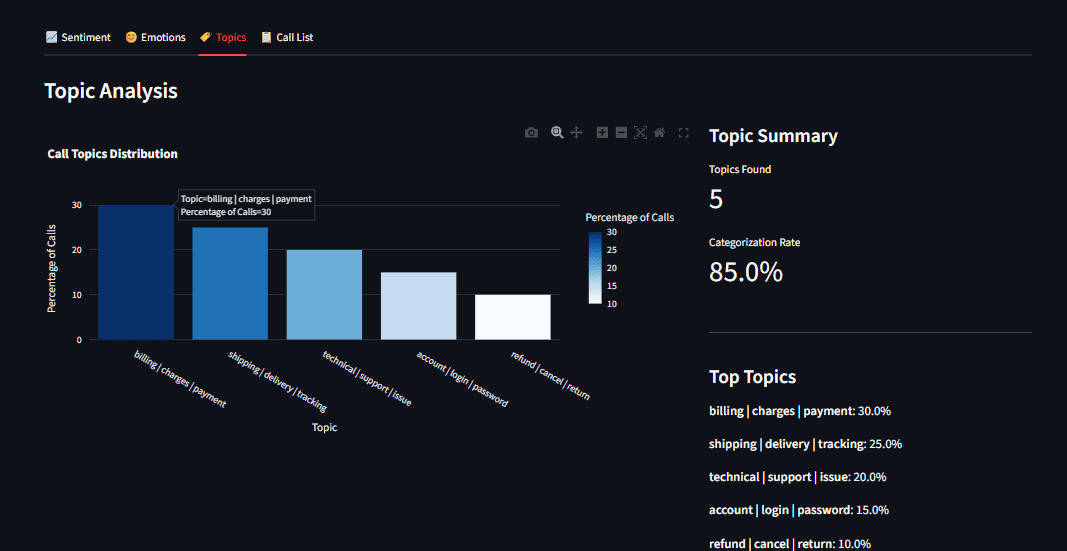
Topic modelling reveals the themes that recur across many calls using BERTopic without those themes being defined in advance.
How BERTopic works
BERTopic embeds each transcript into a vector using a sentence-transformer model, reduces the dimensionality of those vectors with UMAP, clusters similar transcripts with HDBSCAN, and then derives a label for each cluster using a class-based TF-IDF weighting. The output is a set of topics such as “billing issues,” “technical support,” or “product feedback.” Unlike older methods such as Latent Dirichlet Allocation (LDA), BERTopic captures semantic meaning, so phrases like “shipping delays” and “late delivery” group together because they mean the same thing. Topic extraction needs a reasonable number of documents (roughly five to ten at minimum) to find meaningful patterns; single calls are then analysed using the fitted model.
from bertopic import BERTopic

class TopicExtractor:
    def __init__(self):
        self.model = BERTopic(
            embedding_model="all-MiniLM-L6-v2",
            min_topic_size=2,
            verbose=True
        )

    def extract_topics(self, documents):
        topics, probabilities = self.model.fit_transform(documents)

        topic_info = self.model.get_topic_info()
        topic_keywords = {
            topic_id: self.model.get_topic(topic_id)(:5)
            for topic_id in set(topics) if topic_id != -1
        }

        return {
            "assignments": topics,
            "keywords": topic_keywords,
            "distribution": topic_info
        }
Building an interactive dashboard with Streamlit
Raw output is hard to act on, so the final stage presents results in a Streamlit dashboard.
import streamlit as st

def main():
    st.title("Customer Sentiment Analyzer")

    uploaded_files = st.file_uploader(
        "Upload Audio Files",
        type=("mp3", "wav"),
        accept_multiple_files=True
    )

    if uploaded_files and st.button("Analyze"):
        with st.spinner("Processing..."):
            results = pipeline.process_batch(uploaded_files)

        # Display results
        col1, col2 = st.columns(2)
        with col1:
            st.plotly_chart(create_sentiment_gauge(results))
        with col2:
            st.plotly_chart(create_emotion_radar(results))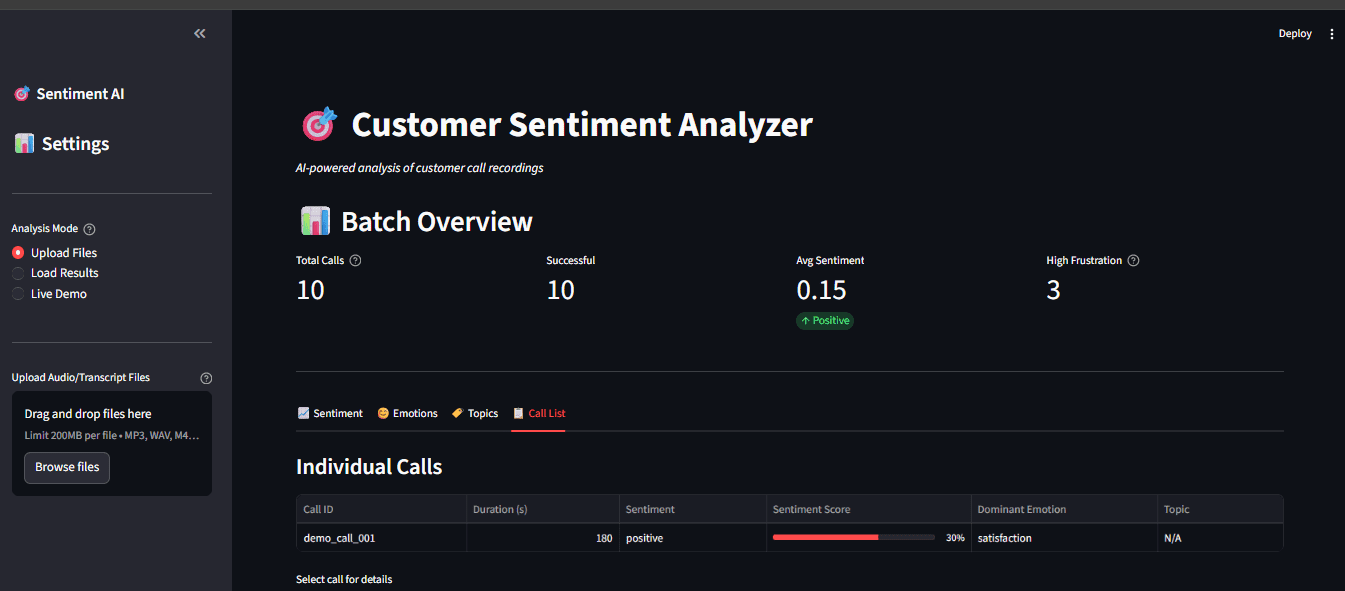
Key features and caching
Caching expensive steps such as model loading and transcription keeps the dashboard responsive, so repeated views do not recompute results that have not changed.
@st.cache_resource
def load_models():
    return CallProcessor()

processor = load_models()
Real-time processing
The same components can process recordings as they arrive, updating the dashboard for near real-time monitoring.
if uploaded_file:
    with st.spinner("Transcribing and analyzing..."):
        result = processor.process_file(uploaded_file)
    st.success("Done!")
    st.write(result("text"))
    st.metric("Sentiment", result("sentiment")("label"))
Practical lessons
Softmax versus sigmoid
The choice of output activation should match the problem. Softmax forces predicted probabilities to sum to one, which suits mutually exclusive classes such as positive versus negative sentiment, since a sentence is rarely both. Sigmoid treats each class independently, which fits emotions, because a single sentence can be, for example, both pleased and surprised at once.
Communicating insights with visualisation
An effective dashboard does more than display numbers; interactive Plotly charts let users hover for detail, zoom into a time range, and toggle data series, turning raw analysis into something teams can act on.
Running the application
Sentiment and emotion analysis can be tested on sample text without any audio files, which runs the text through the model and prints the results to the terminal. A single recording can then be analysed end to end.
python main.py --audio path/to/call.mp3python main.py --batch data/audio/python main.py --dashboard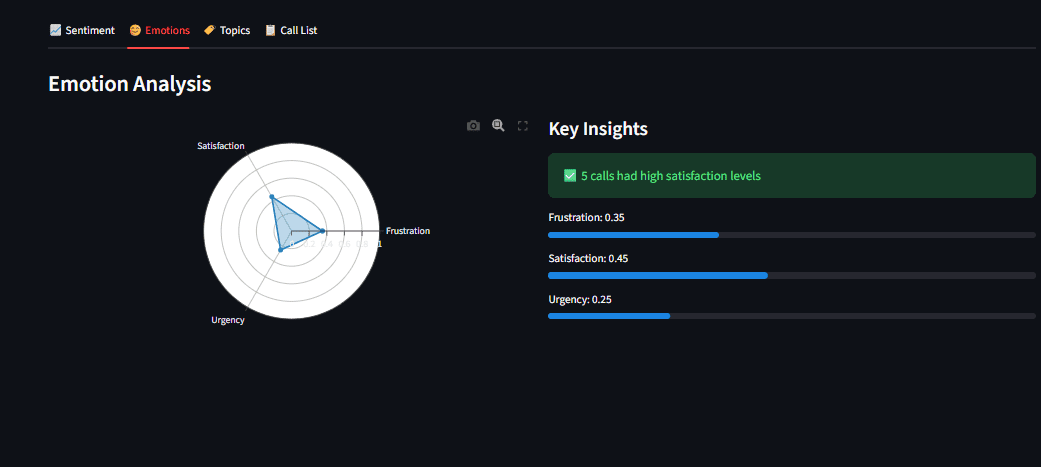
Limitations and what to watch
Local models trade some accuracy and speed for privacy and control. Transcription quality from Whisper depends on audio clarity, accents, overlapping speakers, and domain-specific jargon, and errors at this stage propagate into sentiment and topic results. Sentiment and emotion classifiers reflect the data they were trained on and can misread sarcasm, mixed feelings, or industry-specific language, so spot-checking against human review is advisable before acting on aggregate trends. BERTopic needs enough transcripts to produce stable topics, and its clusters can shift as new data arrives. Running everything locally also requires sufficient compute, particularly for larger Whisper models. Finally, recording and analysing customer calls carries legal and consent obligations that vary by jurisdiction and should be confirmed before deployment.
Conclusion
Combining Whisper, a transformer-based sentiment and emotion classifier, BERTopic, and a Streamlit dashboard makes it possible to turn raw call recordings into structured, searchable insight while keeping sensitive data in house. The same building blocks generalise to other audio sources, from support chats to user interviews, wherever understanding what people are saying at scale is valuable. For a related local-first Python tooling setup, see the guide on setting up a Python project in 2026.
