
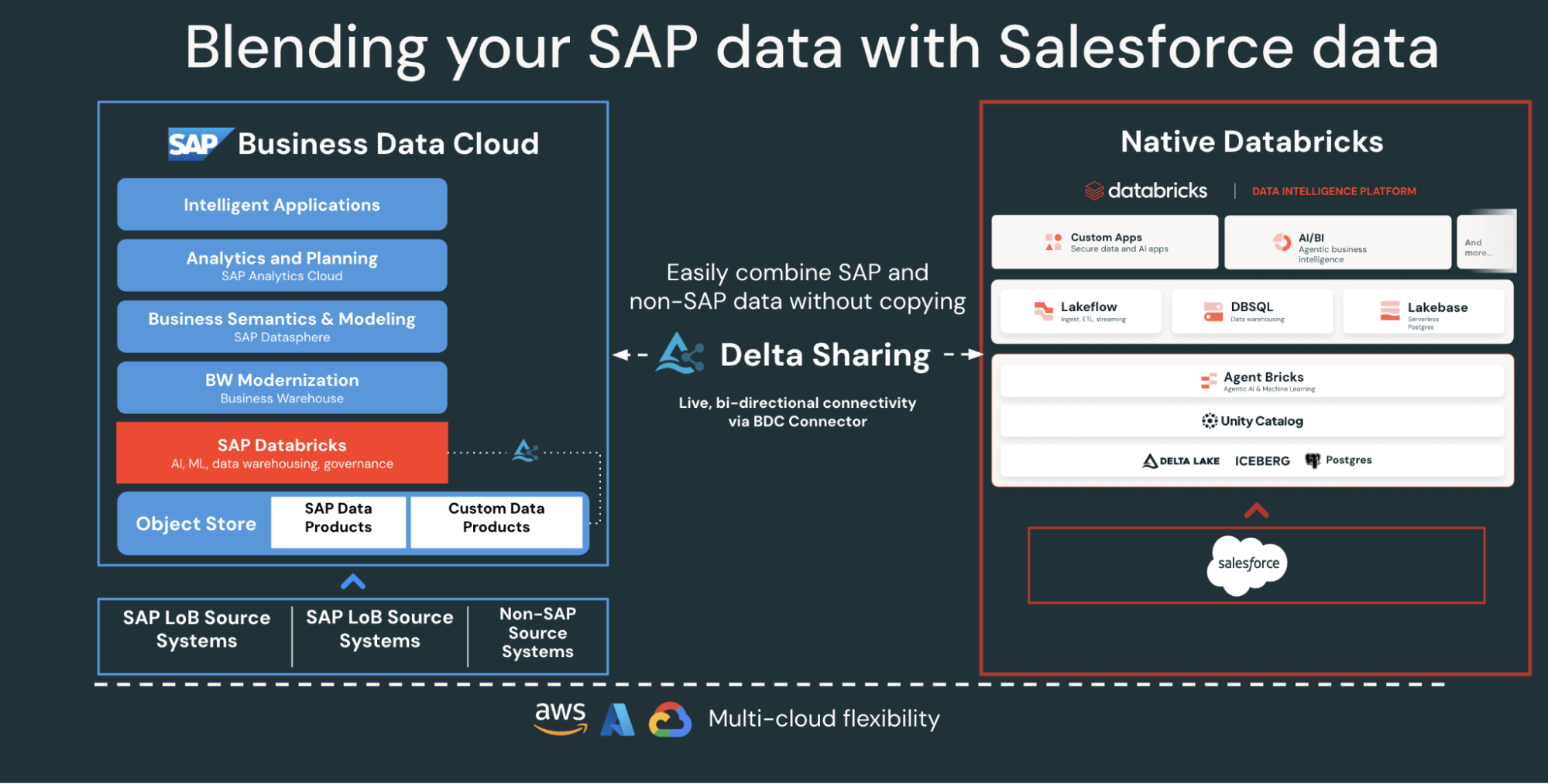
Supplier data touches almost every part of an organization — purchasing, supply chain, finance, and analytics — yet it typically lives in systems that do not talk to each other. Salesforce holds vendor profiles, contacts, and account details; SAP S/4HANA manages invoicing, payments, and general ledger entries. Because the two operate independently, teams lack a complete view of supplier relationships, and the symptoms are familiar: slow reconciliation, duplicate records, and missed opportunities to optimize spend.
This guide walks through how Databricks connects both systems on a single governed foundation to build supplier analytics — without the data copies and latency of traditional ETL.
Why Not Traditional ETL?
Conventional integrations move SAP and Salesforce data with batch ETL or third-party tools, creating multiple copies, adding latency, and complicating governance. The Databricks approach differs on four points:
- Zero-copy SAP access: the SAP Business Data Cloud (BDC) connector for Databricks provides governed, live access to SAP S/4HANA data products through Delta Sharing — no exports, no duplication.
- Incremental Salesforce ingestion: Lakeflow Connect continuously ingests Salesforce data, keeping datasets fresh and consistent.
- Integrated governance: Unity Catalog applies permissions, lineage, and auditing across both sources.
- Declarative pipelines: Lakeflow Spark Declarative Pipelines simplify ETL design and orchestration with automatic optimization.
Together these let data engineers blend SAP and Salesforce data on one platform while retaining enterprise-grade governance.
The Integration Architecture at a Glance
At a high level, SAP S/4HANA publishes business data as curated, SAP-managed data products in the SAP Business Data Cloud. BDC Connect for Databricks exposes those products through zero-copy Delta Sharing. Lakeflow Connect handles the Salesforce side, capturing accounts, contacts, and opportunity data through incremental pipelines. Everything lands under Unity Catalog governance, where declarative pipelines transform the combined data through a medallion architecture — bronze (raw), silver (cleaned and joined), gold (business-ready). The gold layer then feeds AI/BI dashboards and Genie for exploration.
Step 1: Ingest Salesforce Data With Lakeflow Connect
Lakeflow Connect’s managed Salesforce connector handles authentication and automatically manages incremental updates, so the data stays current without manual refreshes.
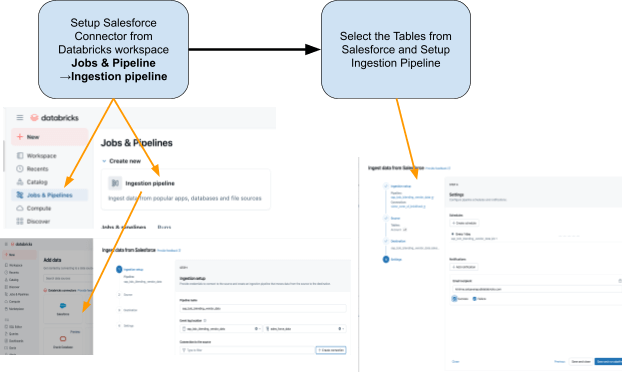
The connector integrates with Unity Catalog for governance, Lakeflow Spark Declarative Pipelines for ETL, and Lakeflow Jobs for orchestration. Two Salesforce tables matter for this use case: Account (vendor and supplier details — account ID, name, industry, type, billing address) and Contact (vendor contacts — contact ID, account ID, name, email).
Step 2: Access SAP S/4HANA Data With the BDC Connector
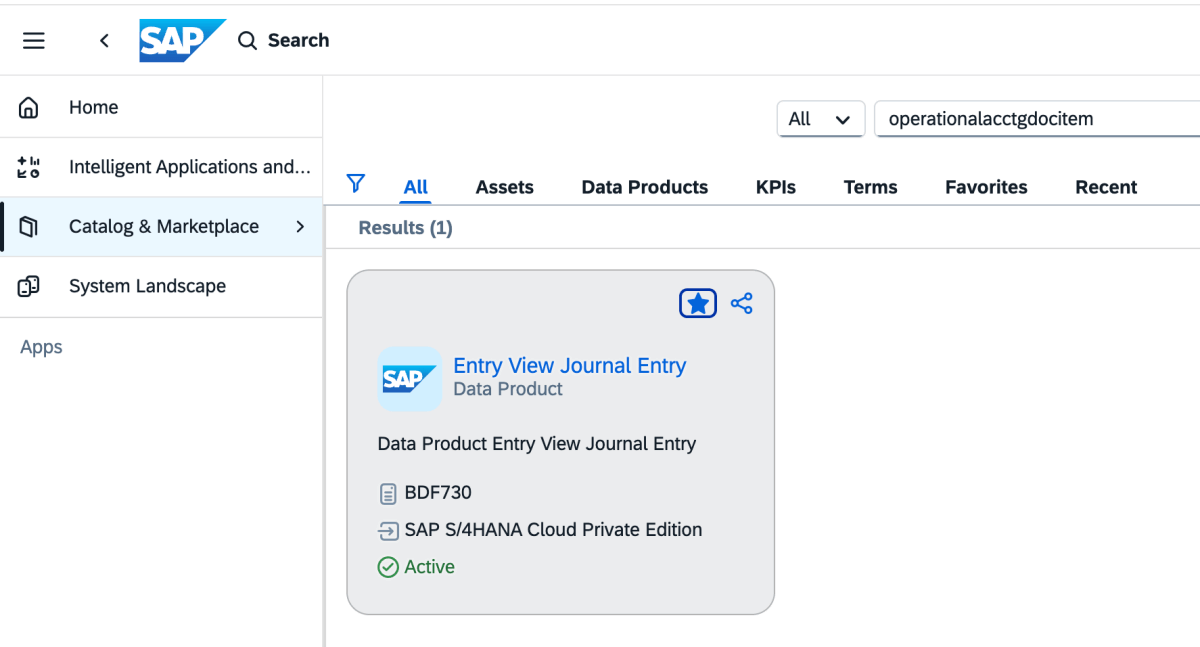
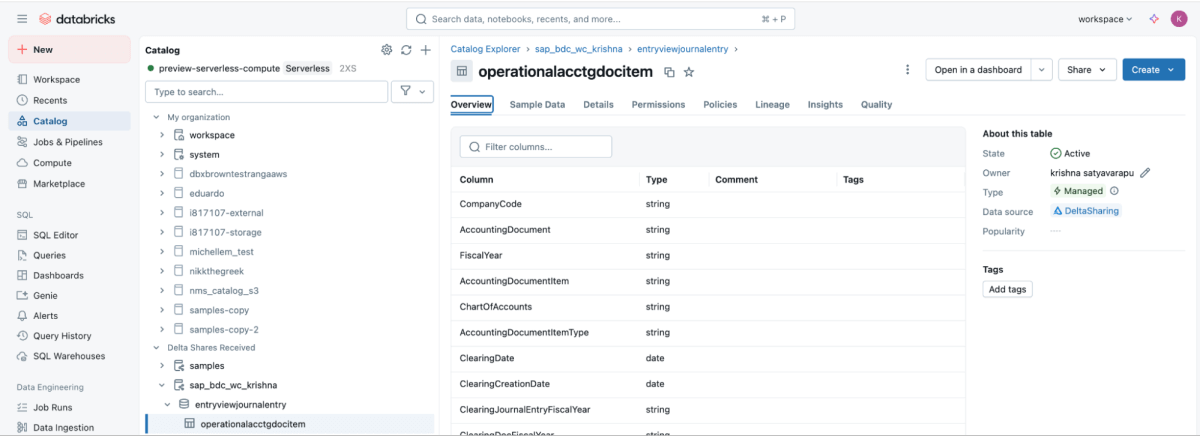
BDC Connect provides live, governed access to SAP S/4HANA vendor payment data directly in Databricks, using the SAP BDC data product sap_bdc_working_capital.entryviewjournalentry.operationalacctgdocitem — the universal journal line-item view. This data product maps directly to the SAP S/4HANA CDS view I_JournalEntryItem (operational accounting document item) ACDOCA.
For readers coming from SAP ECC, the closest physical structures were BSEG (FI line items) with header BKPF, CO postings in COEP, and the open/cleared indexes BSIK/BSAK (vendors) and BSID/BSAD (customers). In S/4HANA these objects are part of the simplified data model, with vendor and G/L line items centralized in the universal journal (ACDOCA) — replacing the ECC pattern of joining several separate finance tables.
The share is configured in the SAP BDC cockpit as follows:
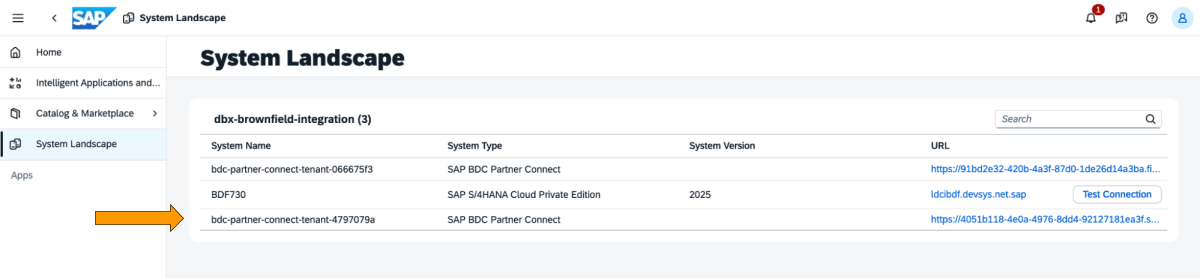
1. Log in to the SAP BDC cockpit and verify the BDC formation in the system landscape, connecting native Databricks via the BDC Delta Sharing connector.
2. Open the catalog and locate the Journal Entry data product.
3. On the data product, choose Share and select the target system.
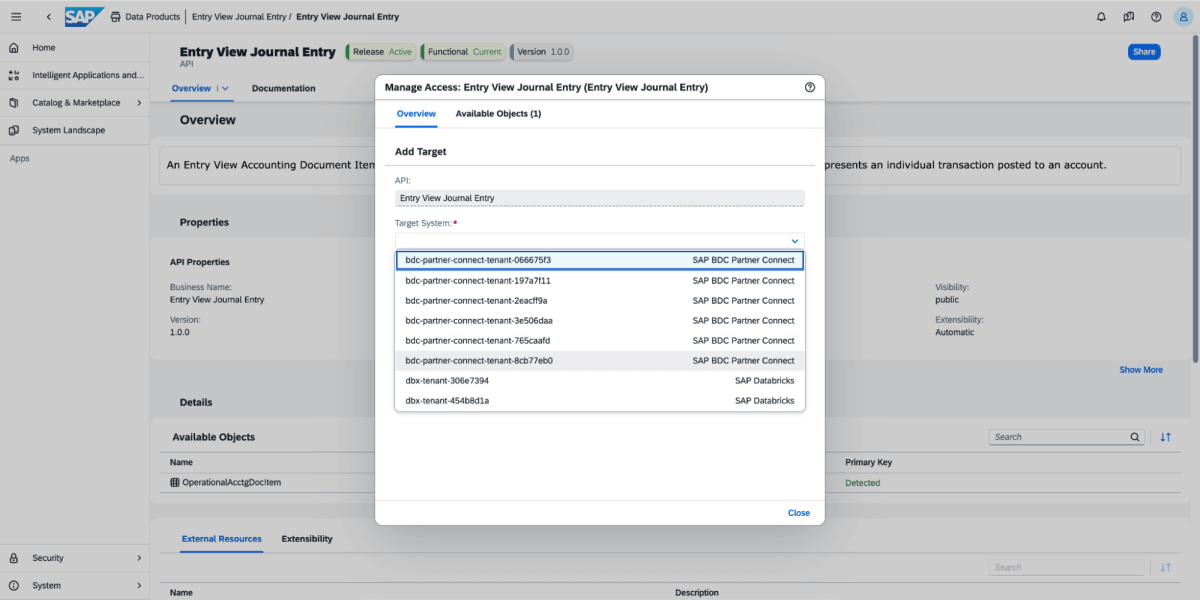
4. Once shared, the data product appears as a Delta Share in the Databricks workspace (the “use provider” permission is required to view providers).
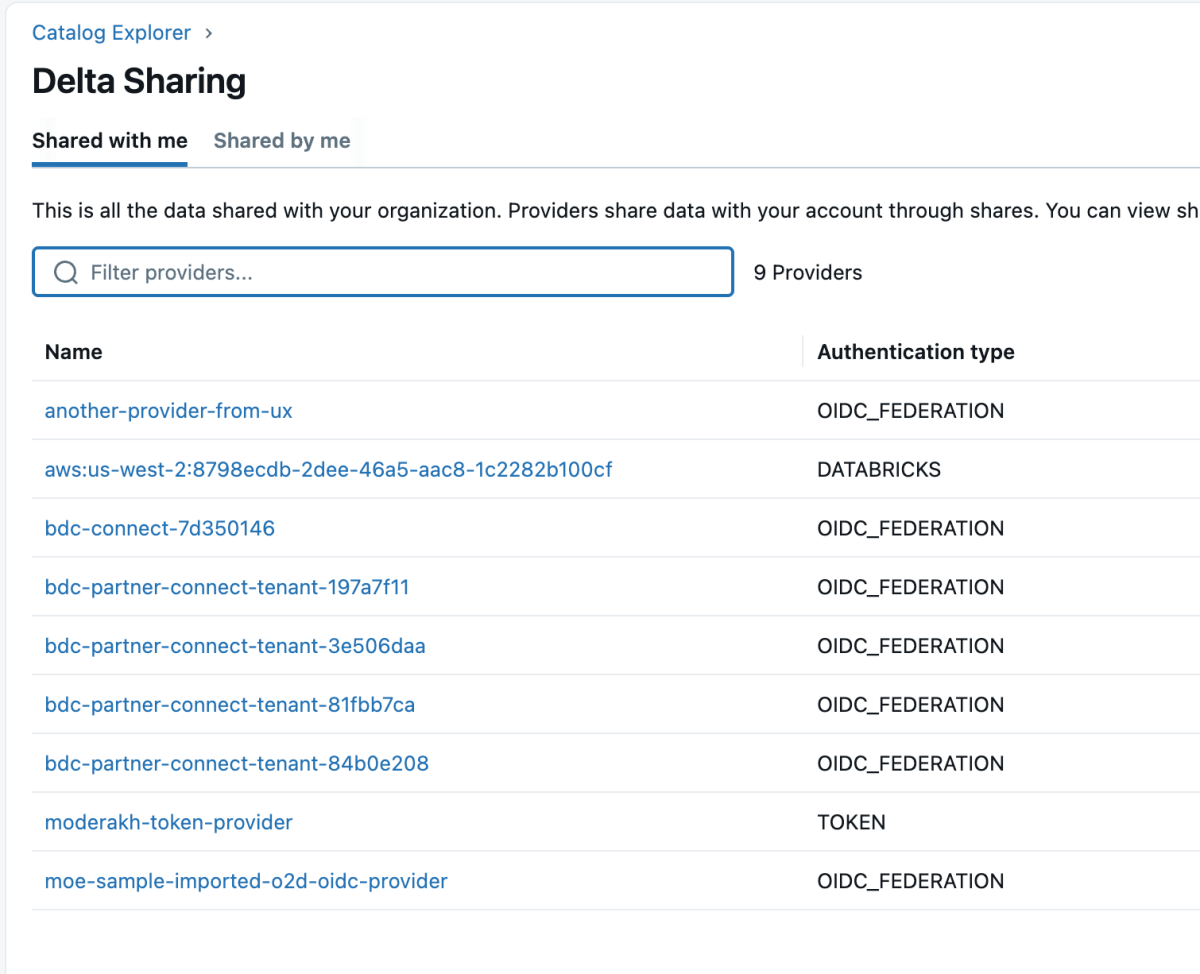
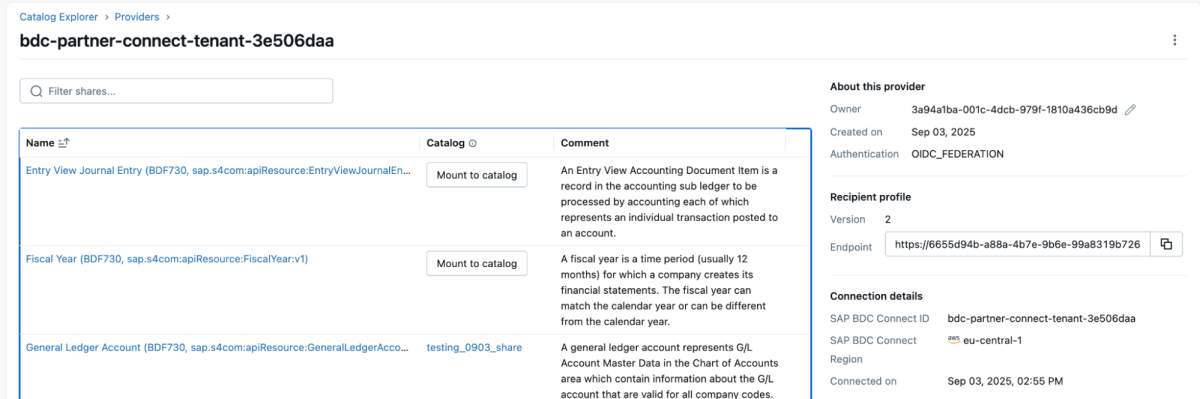
5. Mount the share into a new or existing catalog.
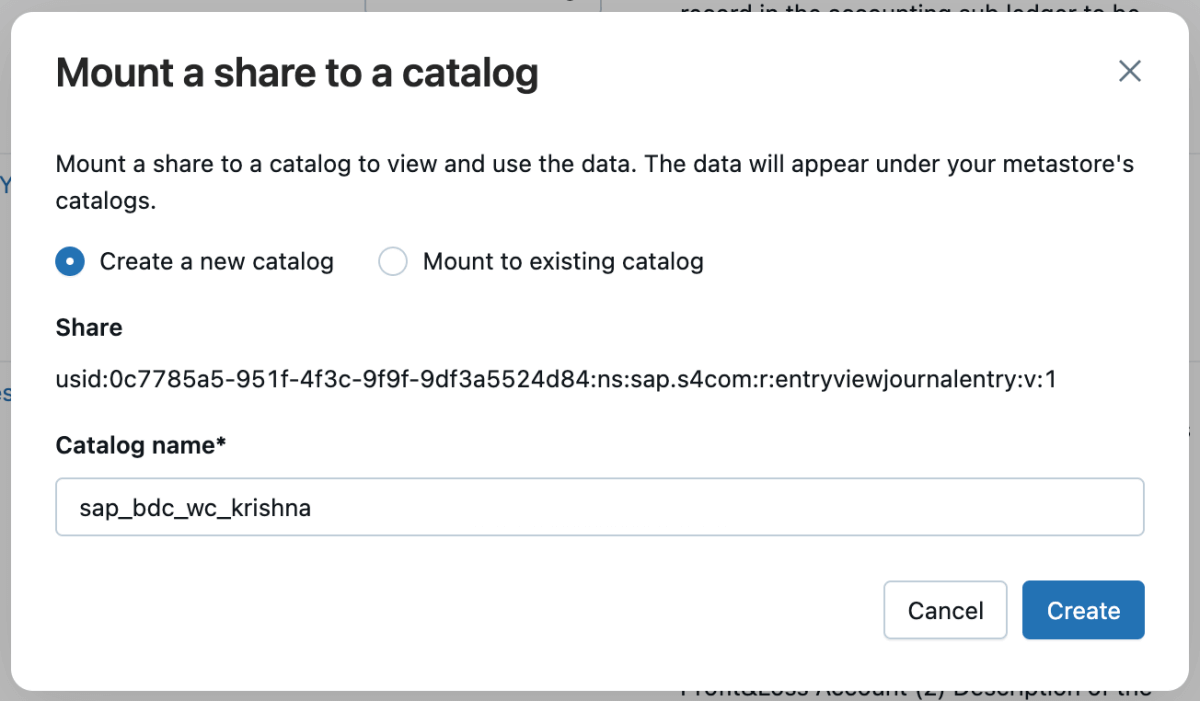
6. After mounting, the share appears in the catalog, ready to query.
Step 3: Blend the Data With Lakeflow Declarative Pipelines
With both sources available, a declarative pipeline joins them. The Salesforce Account table typically carries the field SAP_ExternalVendorId__c, which matches the vendor ID in SAP — this becomes the primary join key for the silver layer. Transformation logic is written in SQL, while Databricks handles optimization and orchestration automatically.
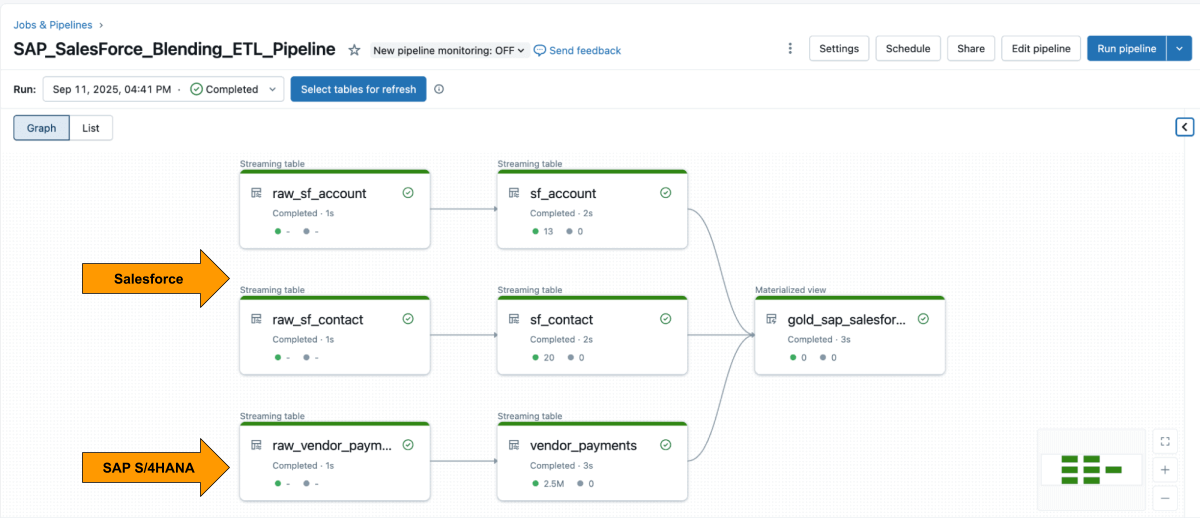
The example query produces a curated, business-level materialized view that unites SAP vendor payment records with Salesforce vendor details, ready for analysis and reporting.
Step 4: Analyze With AI/BI Dashboards and Genie
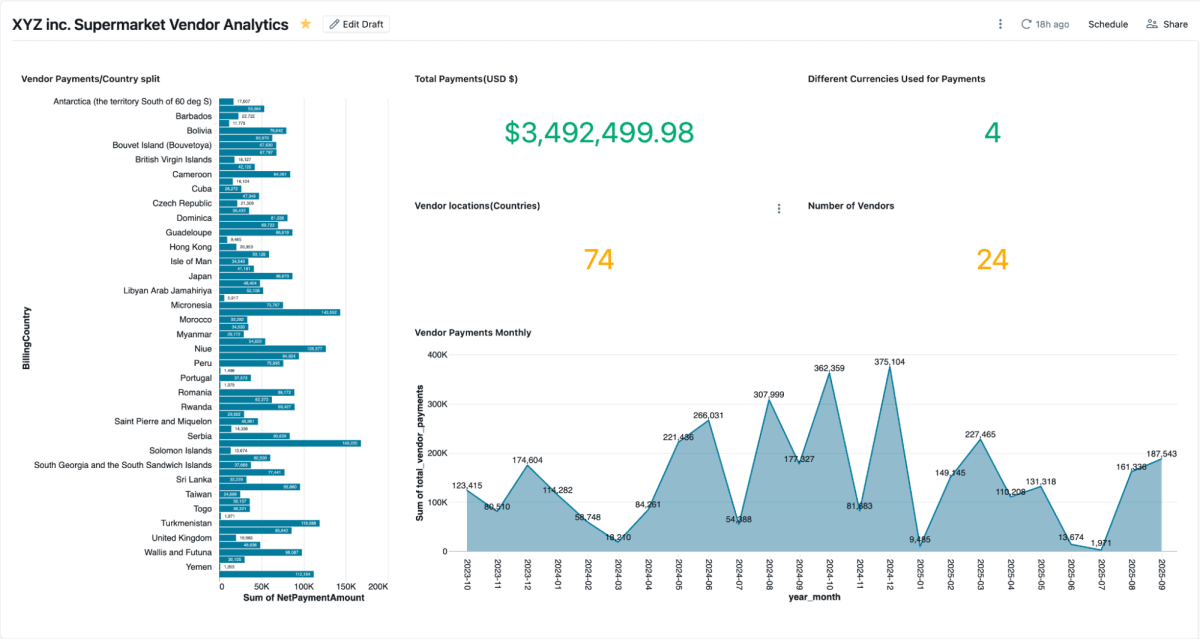
The materialized view can be visualized directly in an AI/BI dashboard, giving procurement and finance teams a shared, current picture of supplier spend.
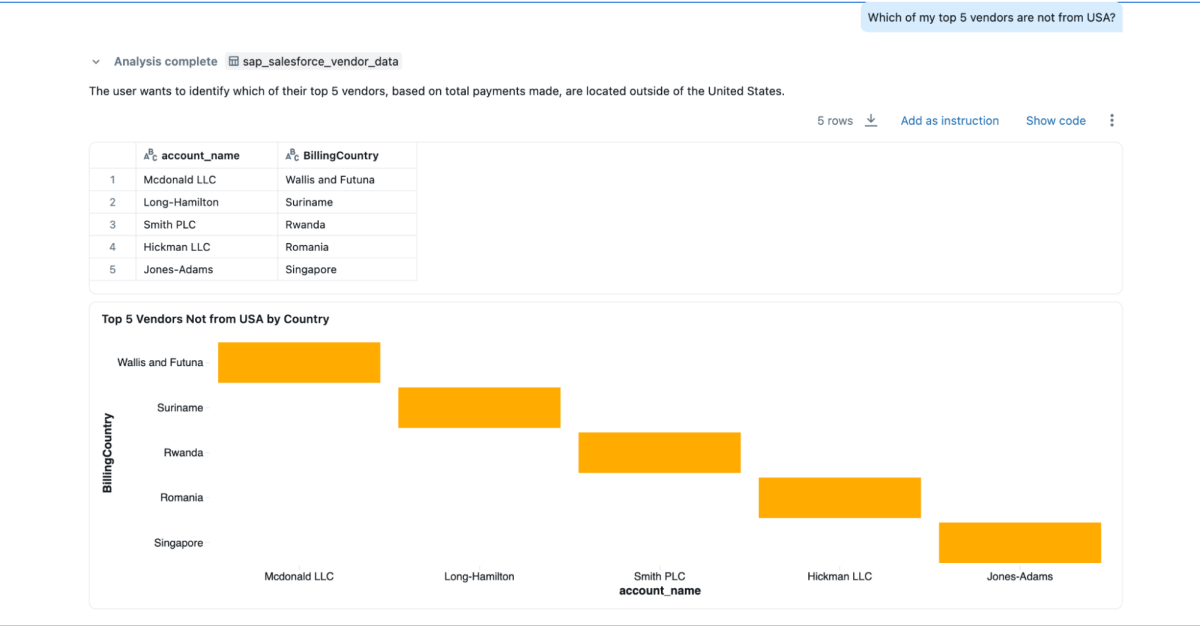
Genie spaces allow natural-language queries over the blended data — questions that were previously unanswerable while the data sat locked in separate systems, such as: who are the top three vendors by payments, including contact details; what are those vendors’ billing addresses; and which of the top five suppliers are located outside the United States.
Business Results
Combining SAP and Salesforce data on one governed platform yields a complete, trustworthy view of supplier performance, payments, and relationships: faster reconciliation, visibility into early-payment discount opportunities, and a cleaner vendor master — joining on the SAP_ExternalVendorId__c field surfaces duplicate or mismatched supplier records so they can be resolved. Unity Catalog keeps everything audit-ready, with consistent lineage, permissions, and auditing, so analytics, AI models, and reports draw on a single trusted source.
Limitations and What to Watch
The pattern assumes specific licensing: SAP Business Data Cloud is a separately licensed SAP offering, and the zero-copy story applies to the curated data products SAP chooses to publish — custom Z-tables and heavily customized ECC estates may still need conventional extraction. Join quality also depends on master-data hygiene; if Salesforce account records lack reliable vendor IDs, the “cleaner vendor master” step becomes a prerequisite rather than a benefit. As with any single-platform consolidation, teams should weigh the governance gains against deepening platform dependence. For the underlying pipeline tooling, see this related guide to Lakeflow on Azure Databricks; the original walkthrough is on the Databricks blog.
Conclusion
Integrating supplier data across SAP and Salesforce no longer means rebuilding pipelines or maintaining duplicate systems. Zero-copy SAP BDC access, incremental Salesforce ingestion, unified governance, and declarative pipelines let teams work from a single governed foundation that brings ERP and CRM data together in near real time — and puts questions that once required a reconciliation project within reach of a dashboard or a natural-language query.
